

About the Author

Antonio Vance is B2B SaaS Operations Director & Lead Reviewer (SaaSFlowLab Editorial Team). He has spent 8+ years deploying and auditing enterprise CRM, marketing automation, and email deliverability infrastructures for digital agencies. At SaaSFlowLab, he directs hands-on testing of software stacks in live production environments to deliver uncompromised, field-verified software reviews.
Most agency owners assume a client portal is the fix for messy delivery, but a portal only hides the mess unless the work behind it is automated. That is the honest frame for this Hubflo review. Hubflo gives every client a branded space for files, tasks, and Stripe invoices, starting at $67 a month, with extra seats billed separately. It removes the “where is this file?” email loop. It does not run funnels, campaigns, or reputation. So the real question is whether you need a portal or a full operating system.
Disclosure: We may earn a commission if you purchase through links in this review, at no extra cost to you. We only recommend tools we use in our own client work.
Quick Executive Summary
- Best For: Agencies and service businesses that want a branded client portal without exposing their internal project board.
- Pricing: Starts at $67 / month, with extra seats at +$49 to +$56 per member.
- Top Strength: One client-facing hub that kills the “where is this file?” email loop.
- Main Drawback: Not a marketing platform, and per-seat fees add up fast once a whole team goes client-facing.
What Is Hubflo?
Hubflo is a client portal and client management suite built for service businesses, agencies, and freelancers who live inside project chaos. Instead of scattering files, approvals, requests, and invoices across email and three different tools, Hubflo gives every client a single place to see progress, upload files, and talk to your team.
For us the difference showed up in the first week: fewer “where is this document?” emails, because the client can just open their portal and grab whatever they need. It is a client-facing layer on top of the way you already run projects, not yet another project management app you have to force clients into.
Who Is Hubflo For?
From our conversations with the product team and from using it with different client types, Hubflo fits three groups best:
- Agencies that need to keep multiple client portals organized without giving clients access to the internal board.
- Freelancers who want a professional delivery experience without paying enterprise prices.
- Service businesses that onboard clients with files, deliverables, and approvals on a weekly basis.
Hubflo Key Features
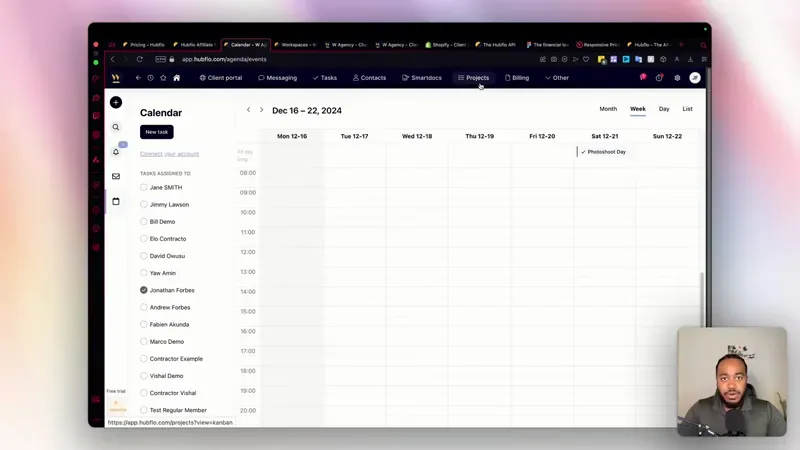
Here is where the tool actually shines in a real agency workflow. These are the features we used every single day:
- Client Portals: each client gets a branded space where they can see assigned tasks, shared files, and project updates. We stopped sending status emails entirely.
- File Management: deliverables and assets live inside the portal, so there is one source of truth and no more “which email had the final file?”
- Project and Task Delivery: tasks are assigned with due dates, and clients mark work as complete or request changes in the same thread.
- Invoicing and Payments: payments are connected through Stripe, so an invoice and a client portal live in the same place instead of being split across tools.
- Automation and Workflow: you can build simple automations for onboarding, status changes, and reminders instead of doing the same manual steps for every client.
- API Access: Hubflo offers an API, which matters if your stack needs custom wiring beyond the built-in connections.
Two Buyer Philosophies: Portal Specialist vs Agency Operating System
A buyer picks Hubflo because the pain is client-facing and narrow. Files get lost in email, approvals stall, invoices sit unpaid, and the internal project board should stay internal. That buyer wants one clean hub per client and a predictable monthly bill. Hubflo starts at $67 and adds seats at $49 to $56, so a small client-facing team can budget it without a finance meeting.
A buyer picks GoHighLevel because the pain is operational and wide. The agency runs funnels, campaigns, pipelines, and reputation for many client accounts, and wants those under one subscription instead of stitching tools together. Speed matters more than portal polish. The buyer is usually the person who owns delivery and marketing at once, not a project coordinator protecting a board.
Each philosophy has a failure point. The portal-first buyer hits a wall when a client asks for a landing page, a review request flow, or a nurture sequence, because Hubflo is not a marketing platform and a second tool enters the stack. The all-in-one buyer hits a different wall when clients need a simple, branded file-and-approval space and the team has to configure it inside a broader system.
Budget logic separates them too. Per-seat pricing rewards keeping the client-facing team small. Flat platform pricing rewards adding more client accounts, not more internal seats. Neither is wrong. They answer different questions about what the agency is actually selling. If you are weighing the two directly, this GoHighLevel vs HubSpot comparison shows how the all-in-one logic plays out against a CRM-first tool.
Hubflo Pricing 2026
Pricing below was checked on 23 October 2026. You pay monthly per plan, with an extra seat fee for every team member you add beyond the base.
| Plan | Price | Extra Member | Best For | Action |
|---|---|---|---|---|
| Starter | $67 / month | +$49 / month | Solo operators and small teams | See the GoHighLevel Alternative → |
| Pro | $142 / month | +$49 / month | Growing agencies with multiple clients | See the GoHighLevel Alternative → |
| Scale | $262 / month | +$56 / month | Multi-client agencies and larger teams | See the GoHighLevel Alternative → |
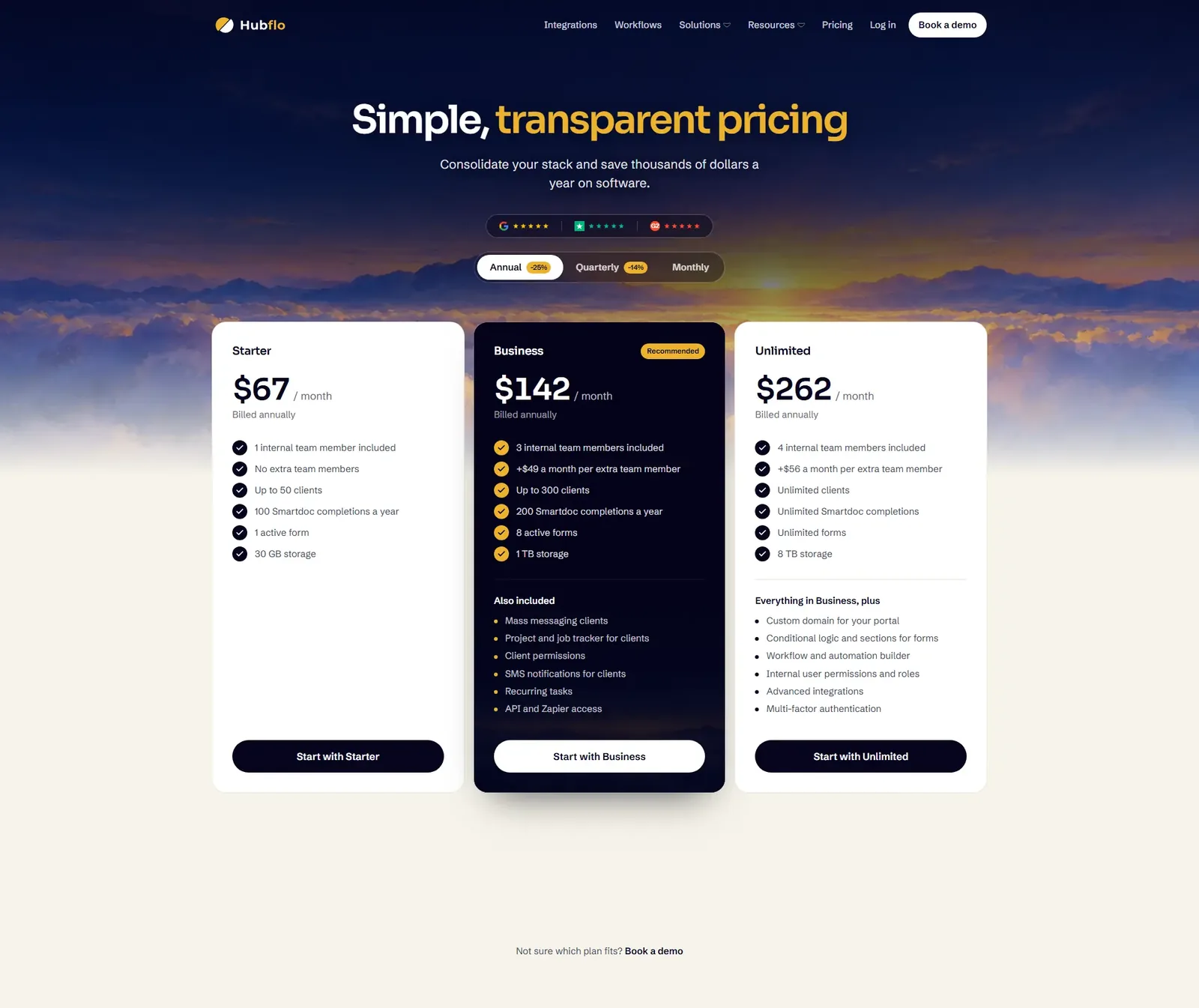
Annual billing starts from $79 / month and from $599 on higher tiers; we could not confirm the exact free trial length, so we would rather flag it than guess. In our experience the right question is not “which plan has the lowest number” but “how many extra seats do your client accounts actually need,” because that is where per-seat pricing adds up fast.
Hubflo vs Competitors
We compared Hubflo against the tools our clients were already using or asking about. Price points are approximate starting prices.
| Tool | Focus | Pricing (approx) | Best For | Action |
|---|---|---|---|---|
| Hubflo | Client portal + client management | From $67 / month | Agencies that want one client-facing hub | See the GoHighLevel Alternative → |
| Assembly (Copilot) | Client portal and CRM | Comparable mid-range | Teams with heavy CRM + portal needs | – |
| GoHighLevel | All-in-one marketing + CRM | From $97 / month | Agencies that also run funnels and marketing | – |
| ClickUp | Project management | Freemium | Internal team task tracking | – |
| Notion | Docs and workspace | Freemium | Teams building their own wiki | – |
| Trello | Kanban task boards | Freemium | Simple visual task lists | – |
The real limitation we found: if your agency also needs marketing automation, funnels, and reputation management under one roof, GoHighLevel covers more ground. If your only pain is giving clients a professional portal without exposing your internal workflow, Hubflo is the cleaner, cheaper fit.
Hubflo Pros & Cons
Pros
- Clients stop chasing files in email; the portal is the single source of truth.
- Branded portal experience makes a solo freelancer look like a bigger operation.
- Stripe-connected payments reduce the invoice-to-cash friction.
- API and integrations let you fit it into an existing stack instead of rebuilding.
- Flat per-seat pricing makes budgeting predictable at the agency level.
Cons
- Not a full marketing automation platform; you will still need a separate tool for funnels and campaigns.
- Per-seat costs add up quickly once you add many client-facing team members.
- Some heavier CRM features are thinner than purpose-built CRMs like Assembly or GoHighLevel.
- Free trial details were not confirmed in our 2026-10-23 crawl, so test the flow yourself before committing.
Integrations & Automation
In our setup, the most valuable connections were the obvious ones: Stripe for payments, Zapier for glue between Hubflo and the rest of the stack, and the API when we needed something custom. When setting this up for a client, we used Zapier to push new portal tasks into Slack so no one had to watch a dashboard all day.
- Stripe: invoices and payments live next to the client portal.
- Zapier: connect hundreds of apps without writing code.
- API: custom sync for agencies with a developer on the team.
Build the Client Onboarding and File-Chase Automation in GoHighLevel
This is the flow an agency builds when it wants portal-style delivery without adding a separate portal subscription. It runs on standard GoHighLevel blocks and covers onboarding, file collection, and payment follow-up.
- Trigger: Form Submitted (New Client Intake form). Action: Create/Update Opportunity in the Onboarding pipeline at stage “Kickoff.” Action: Send Email ‘Welcome {{contact.first_name}}, your portal is ready. Upload your brand assets here before our kickoff call.’
- Action: Add Contact Tag ‘client-onboarding.’ Action: Assign to User (the account manager listed on the intake form). Action: Internal Notification to that user with the message ‘New client {{contact.name}} needs a kickoff call booked.’
- Wait: 2 days. If/Else: contact has tag ‘assets-uploaded.’ If yes, Go To the kickoff reminder step. If no, Action: Send SMS ‘Hi {{contact.first_name}}, we still need your logo and brand files to start. Reply with a link or upload them here.’
- Wait: until the contact replies. Trigger: Customer Replied. Action: Add Contact Tag ‘assets-uploaded.’ Action: Send SMS ‘Got it, thank you. Your account manager will confirm the kickoff time today.’
- Trigger: Customer Booked Appointment (Kickoff call calendar). Action: Send Email with the agenda and the file checklist. Wait: until 24 hours before the appointment. Action: Send SMS ‘Reminder: kickoff tomorrow at {{appointment.start_time}}. Reply C to confirm or R to reschedule.’
- If/Else: contact replied R. If yes, Action: Send SMS with the reschedule link and Add Task for the account manager. If no, Action: Send SMS ‘See you tomorrow. Join here: {{appointment.meeting_link}}.’
- Trigger: Appointment Status (Showed). Action: Create/Update Opportunity to stage “Active Delivery.” Action: Send Email ‘Kickoff done. Your deliverables and invoices now live in your client hub.’
- Trigger: Invoice Paid. Action: Send SMS ‘Payment received, thank you {{contact.first_name}}. Next milestone is scheduled.’ If/Else: invoice unpaid after 7 days, Action: Send Email with a polite payment reminder and Add Task for the account manager.
- Trigger: Custom Date Reminder (project milestone date). Action: Send Email ‘Milestone due {{contact.milestone_date}}. Review the files and approve or request changes.’ Wait: 3 days. If/Else: no reply, Action: Send SMS ‘Quick nudge on the milestone approval. Reply A to approve or C for changes.’
Measure four things: time from intake to kickoff, percentage of clients who upload assets within 48 hours, appointment show rate, and days from invoice sent to paid. Those four numbers tell you whether the automation replaced the portal or just added noise.
Running the same flow in Hubflo means using its built-in automations for onboarding, status changes, and reminders, plus Zapier to push portal tasks into Slack. Hubflo does not cover funnels or campaigns, so any marketing step in this flow needs a second tool.
What This Looks Like in a Real Agency Setup
Imagine a 12-person branding studio in Portland, Oregon. Six account managers each juggle eight clients, and every deliverable moves through email. The team logs roughly 20 status emails a day and loses two files a month to version confusion. A portal gives each client one branded space, so files, tasks, and Stripe invoices sit together. If that kills 15 of the 20 daily status emails, the team recovers close to two hours a day across the group. This is an illustrative scenario, not a reported result.
Now imagine the same studio also sells landing pages and review campaigns. The portal handles delivery, but funnels and reputation need another subscription. That is the moment the buyer starts comparing a portal specialist against an all-in-one platform, and the decision shifts from file cleanup to how many systems the agency wants to pay for and maintain. The GoHighLevel alternatives list is a useful place to see what else sits in that all-in-one category.
Best Hubflo Alternatives
If Hubflo is not the right fit, these are the alternatives we would evaluate first:
- Assembly (Copilot): the closest competitor for client portals plus CRM features, with a more complex feature set.
- GoHighLevel: the all-in-one choice for agencies that also want marketing, funnels, and CRM in one subscription.
- ClickUp: a strong project management layer if your pain is internal task tracking rather than client delivery.
- Notion: flexible workspace if your team prefers to build its own client hubs with docs and databases.
- Trello: the simplest kanban option for very small teams that need almost no onboarding.
FAQ
Who is Hubflo client portal designed for?
Service businesses, agencies, and freelancers who need to share files, deliverables, and project updates with clients in one branded place instead of through email.
Does Hubflo have better integrations than Assembly?
Hubflo covers the core connections most agencies need, like Stripe, Zapier, and an API. Assembly brings a broader CRM-oriented feature set, so the better choice depends on whether you need portal depth or CRM breadth.
How does Hubflo compare to Assembly for project management?
Hubflo keeps project delivery clean and client-facing, while Assembly leans heavier into CRM and pipeline management. If your main pain is client delivery, Hubflo is simpler to run.
What other apps does Hubflo integrate with?
Beyond Stripe and Zapier, Hubflo exposes an API, which means you can wire in most tools your stack uses, from Slack and Gmail to custom internal systems.
Does Hubflo offer an API?
Yes. The API is one of the reasons we could connect Hubflo to the custom workflows we already ran for clients.
How do I create a client portal with Hubflo?
In the Hubflo workspace you set up the client account, add your team members to the plan, and invite the client to their portal. Files, tasks, and invoices are then shared from that single hub.
SaaS FlowLab Editorial Team
B2B Operations Specialists – We run client operations for digital agencies and test SaaS tools in real production workflows. Our reviews reflect hands-on experience, not vendor brochures.
Who Should Actually Pay for Hubflo
Day 1: list every client touchpoint that currently runs through email and count the status messages you send in a week. Day 3: map one onboarding flow end to end, from intake form to first invoice, and note where a portal would help versus where marketing automation would. Day 7: pick the tool that matches the wider pain, then build the first three steps of the flow above and watch the numbers for two weeks. If budget is the sticking point, check the GoHighLevel pricing breakdown before you commit.