
Executive Summary
Most hubspot CRM review posts call the free tier a no-brainer. That advice skips the invoice that shows up once your database grows and a second hub goes live. The free CRM is genuinely easy to adopt, and the Marketing and Sales hubs are strong for content-led B2B teams. But the platform is modular by design: charges stack across hubs, seats, and contact bands. This review covers what HubSpot does in 2026, where the cost compounds, and when an all-in-one like GoHighLevel fits better.
The short version for agencies and SMB operators: if you need a clean, adoption-friendly CRM with best-in-class content marketing, HubSpot is a legitimate choice – just budget for the contact tiers. If you need one flat platform for CRM plus funnels, email, SMS, and client portals, compare it against the real cost of GoHighLevel in 2026 before you commit.
Table of Contents
- What Is HubSpot CRM?
- Two Buying Philosophies: Modular Depth vs Flat Coverage
- Who Is HubSpot CRM For?
- HubSpot Key Features (Tested)
- Build the Lead-to-Close Follow-Up in GoHighLevel
- What the Math Looks Like in Practice
- HubSpot Pricing 2026
- Hidden Costs When You Scale
- HubSpot vs GoHighLevel
- Marketing Hub & Sales Hub
- Pros & Cons
- Integrations & Ecosystem
- The Agency Rebill Play
- Match Your Team to HubSpot or Walk Away
- FAQ
- The Break-Even Point for HubSpot CRM
What Is HubSpot CRM?
HubSpot CRM is the free contact, deal, and pipeline management layer of the HubSpot platform, which also includes paid hubs for marketing, sales, service, CMS, and operations. The CRM itself is genuinely free with unlimited users and unlimited contacts – the paid products sit on top and add automation, reporting, sequences, and campaign tools.
For a small team, the free CRM is one of the fastest ways to get everyone using a shared source of truth: contact records, deal stages, tasks, and email tracking work out of the box. The catch is that every serious growth use case – email sequences, workflows, custom reports, higher contact volumes – lives behind a paid hub tier.
Two Buying Philosophies: Modular Depth vs Flat Coverage
A buyer picks HubSpot because the company sells through content. Marketing owns the tool, the blog and landing pages live in the same system, and reporting has to satisfy a sales manager who wants clean dashboards. Budget logic follows headcount and database size: the bill is expected to rise as the team and contact list grow. The tool is owned by marketing operations, and depth beats breadth.
A buyer picks GoHighLevel because the work is client delivery, not content marketing. An agency or service business runs many small accounts, needs funnels, email, SMS and client portals under one login, and wants one flat subscription instead of a stack of per-seat charges. Speed matters more than reporting polish. The owner is usually the operator, not a marketing department.
Each philosophy breaks down at the edges. HubSpot’s modular model becomes hard to predict when a second hub and a higher contact band land in the same quarter, and funnel building plus SMS depth are weaker than an all-in-one. GoHighLevel’s flat model can feel thin for a B2B team that needs advanced attribution and a native CMS. The mistake is buying one philosophy while running the other business.
If your growth engine is inbound content and your reporting has to stand up to a sales leader, the modular path earns its cost. If your growth engine is many client accounts and fast campaign launches, flat coverage wins. Read the GoHighLevel vs HubSpot comparison before you sign either contract.
Who Is HubSpot CRM For?
From our deployments with client ops teams, HubSpot CRM fits three profiles best:
- B2B companies that live in content marketing: if inbound is your engine, HubSpot’s CMS, blogging, SEO, and marketing automation are hard to beat.
- Sales teams that want adoption: the UI is intuitive, so you do not fight your reps on data entry.
- Growing SMBs that expect to add hubs over time: you can start free and add exactly the module you need next.
HubSpot Key Features (Tested)
We tested the core CRM in a live client-ops setup. These are the features that actually earn their keep:
- Contact & company database: unlimited contacts, custom properties, and clean activity timelines on the free tier.
- Deal pipelines: multiple pipelines, simple drag-and-drop stages, and revenue reporting at the company level.
- Email tracking & templates: open and click tracking on the free layer; sequences and automation require Sales Hub.
- Task & meeting tools: native meeting scheduler that syncs with Google/Outlook calendars.
- Workflows: powerful automation builder, but limited on free and gated by Marketing Hub tiers.
- Reporting dashboards: solid standard dashboards; custom reports need paid seats.
- App ecosystem: one of the largest marketplaces in B2B SaaS, plus a clean API.
Build the Lead-to-Close Follow-Up in GoHighLevel
This is the flow an agency or service business builds to replace the paid HubSpot sequences it was renting. It runs inside one sub-account and uses only native blocks.
- Trigger: Form Submitted on the ‘Free Audit Request’ form. Action: Add Contact Tag ‘audit-lead’. Action: Create/Update Opportunity in the ‘New Audit’ pipeline at stage ‘New’. Action: Assign to User, round-robin across the delivery team.
- Action: Send SMS within 2 minutes: ‘Hi {{contact.first_name}}, your audit request landed. I am {{user.first_name}} and I will review your site today. What is the best email for the report?’
- Wait: 20 minutes. If/Else: check whether the contact replied. If yes, go to the booking branch. If no, Action: Send Email with subject ‘Your audit is queued’ and a calendar link.
- Trigger: Customer Booked Appointment on the ‘Audit Call’ calendar. Action: Send SMS: ‘{{contact.first_name}}, you are booked for {{appointment.start_time}}. Reply RESCHEDULE if the time stops working.’ Action: Add Task for the assigned user, due one hour before the call.
- Wait: until 24 hours before the appointment. Action: Send SMS: ‘Quick reminder for tomorrow at {{appointment.start_time}}. Bring your login details if you want the fixes applied live.’
- Trigger: Appointment Status changes to ‘Showed’. Action: Send SMS: ‘Thanks for the call, {{contact.first_name}}. Your audit notes are in your inbox within the hour.’ Action: Create/Update Opportunity to stage ‘Proposal’. Action: Send Review Request after 3 days.
- If/Else on Appointment Status ‘No Show’: Action: Send SMS: ‘We missed you at {{appointment.start_time}}. Want me to send the calendar link again?’ Wait: 1 day. If no reply, Action: Voicemail Drop and Add Task for a manual call.
- Trigger: Payment Received on the audit invoice. Action: Add Contact Tag ‘paid-client’. Action: Remove from Workflow the nurture sequence. Action: Internal Notification to the account owner.
Measure three numbers: reply rate on the first SMS, show rate on the Audit Call calendar, and the share of opportunities that reach ‘Proposal’ within seven days. If the show rate drops, shorten the reminder window. If replies stall, rewrite the first message, not the whole flow.
Running the same sequence in HubSpot means Sales Hub sequences and Marketing Hub workflows, both gated behind paid tiers and contact bands. SMS and voicemail are not native, so you add integrations and pay for them separately.
What the Math Looks Like in Practice
Imagine a B2B software company in Austin, Texas, with 14 employees, four sales reps and a marketing lead. It runs HubSpot Marketing and Sales Professional at about 5,000 contacts. The combined bill lands near $3,000 per month, and the next contact band is coming. The team maps every workflow it actually uses: lead capture, a five-email nurture, deal-stage alerts and a monthly report. It keeps HubSpot for the blog and SEO, drops the Sales hub seats it does not use, and moves client-facing follow-up into GoHighLevel at a flat subscription. The projected saving is roughly $1,200 per month, which covers a part-time contractor. This is an illustrative scenario, not a reported result.
Imagine a digital consultancy in Columbus, Ohio, with eight employees and twelve retainer clients. Each client sits on a separate HubSpot portal, and per-client hubs plus seats stack to between $1,500 and $3,500 per month across the portfolio. The owner moves delivery into GoHighLevel sub-accounts, keeps one HubSpot portal for the consultancy’s own content, and bills clients a flat management fee. At twelve accounts, the blended software cost drops enough to protect the margin on every retainer. The arithmetic is simple: fewer portals, fewer seats, one predictable line item. Treat these numbers as a planning example only.
HubSpot Pricing 2026
Pricing below is from the official hubspot.com pages and our 2026 crawls. The headline story: the CRM is free, but the hubs are where the real bill builds, and most plans are priced per seat and per contact tier.
| Plan | Typical Starting Price | What You Actually Get |
|---|---|---|
| Free CRM | $0 | Unlimited contacts & users, contact/deal pipelines, email tracking, basic reporting |
| Starter (per hub) | $15-$20/mo per seat | Light automation, email sequences, basic reporting |
| Professional (per hub) | ~$800/mo (approx. at 2,000 contacts) | Full workflows, custom reporting, ABM, higher contact tiers |
| Enterprise | From ~$3,600/mo (custom contacts) | Advanced permissions, predictive scoring, role-based access |
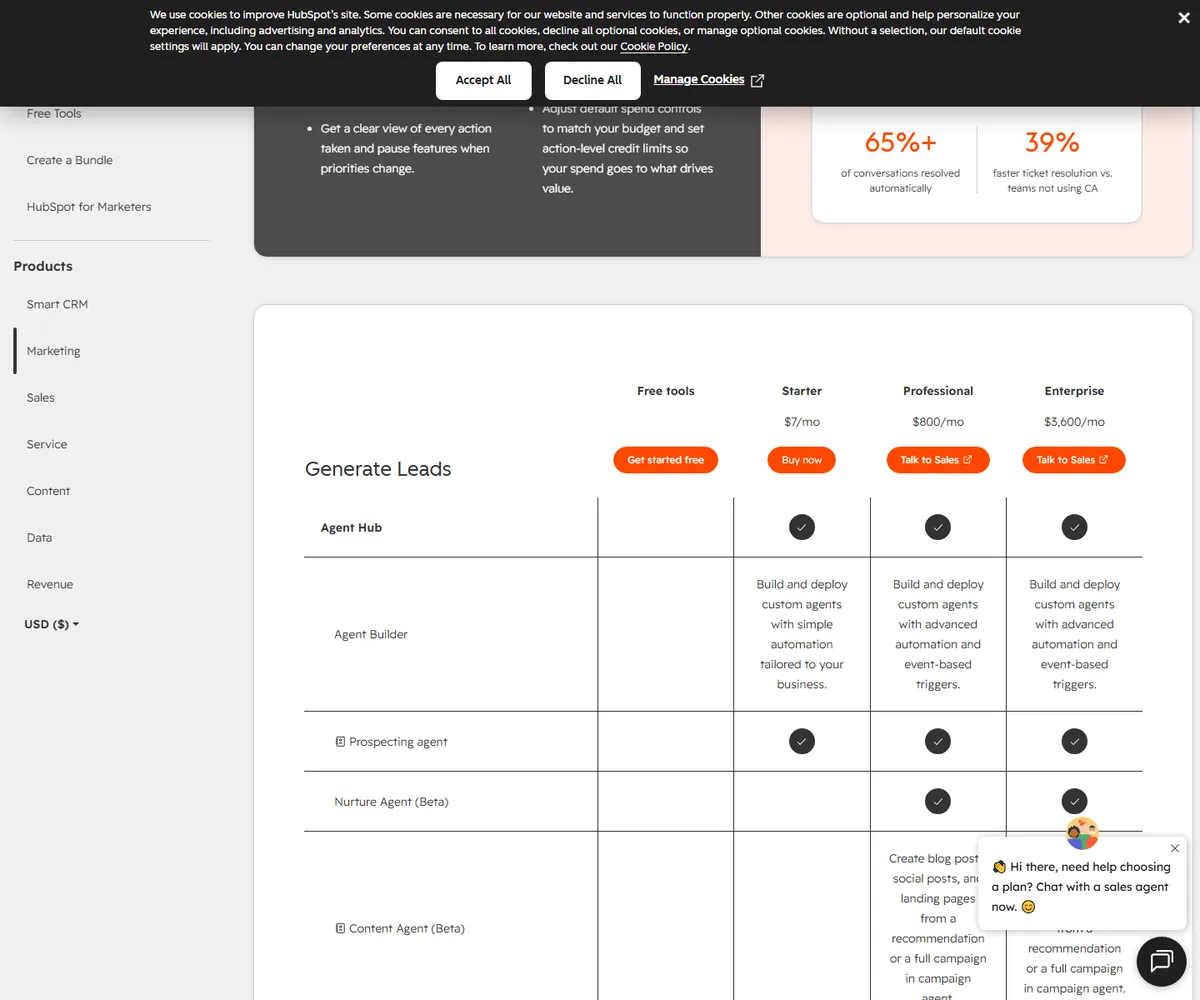
Two numbers matter more than the sticker: contact tier and seat count. HubSpot bills a hub price that includes a contact band (for example up to 2,000 contacts on many Professional tiers); every band you cross adds significant monthly cost, and every paid seat adds on top. A 5-seat Marketing + Sales Professional deployment at 5,000 contacts can realistically land between $2,500 and $5,000+/month.
Hidden Costs When You Scale
The most common surprise we see with HubSpot is not the subscription – it is the compound cost of scaling:
| Cost Driver | What Happens at Scale | Typical Impact |
|---|---|---|
| Contact tiers | Every band you cross raises the hub price | +$100s/mo per band per hub |
| Paid seats | Sales/Marketing seats are per user | $15-$150+/mo per seat |
| Multiple hubs | Marketing + Sales + Service + Ops stack | 2-4x the single-hub bill |
| Add-ons | Dedicated IP, reporting add-ons, CMS extras | $50-$500+/mo extra |
| Migration & admin | Data cleanup and integrations cost time, not just money | Setup hours + ongoing admin |
For an agency running 5-10 client portals on HubSpot, this is why many operators end up comparing HubSpot to a flat-price all-in-one. The GoHighLevel vs HubSpot comparison breaks down exactly where each platform wins on cost.
HubSpot vs GoHighLevel: Honest Take
HubSpot wins on content marketing, reporting polish, and enterprise adoption. GoHighLevel wins on flat pricing, agency features, and all-in-one coverage. HubSpot is modular – you buy exactly what you need, but you pay per hub, per seat, and per contact band. GoHighLevel is a single flat subscription ($97-$497) that bundles CRM, funnels, email, SMS, and client portals.
The decision pattern we see in 2026: B2B companies with serious inbound content choose HubSpot; agencies and service businesses that need one engine for many clients choose GoHighLevel. If you manage multiple client accounts and want white-label/saas mode, GoHighLevel’s sub-account architecture is a different class of tool. See the full head-to-head for the feature-by-feature details.
Marketing Hub & Sales Hub: The Real Engine
Where HubSpot separates from plain CRMs is the Marketing and Sales hub combination. Marketing Hub gives you a native CMS, landing pages, email marketing, workflows, and SEO tools in one stack; Sales Hub adds sequences, meeting links, and deal automation. When both are connected, you get a clean lead-to-close loop with genuinely good reporting.
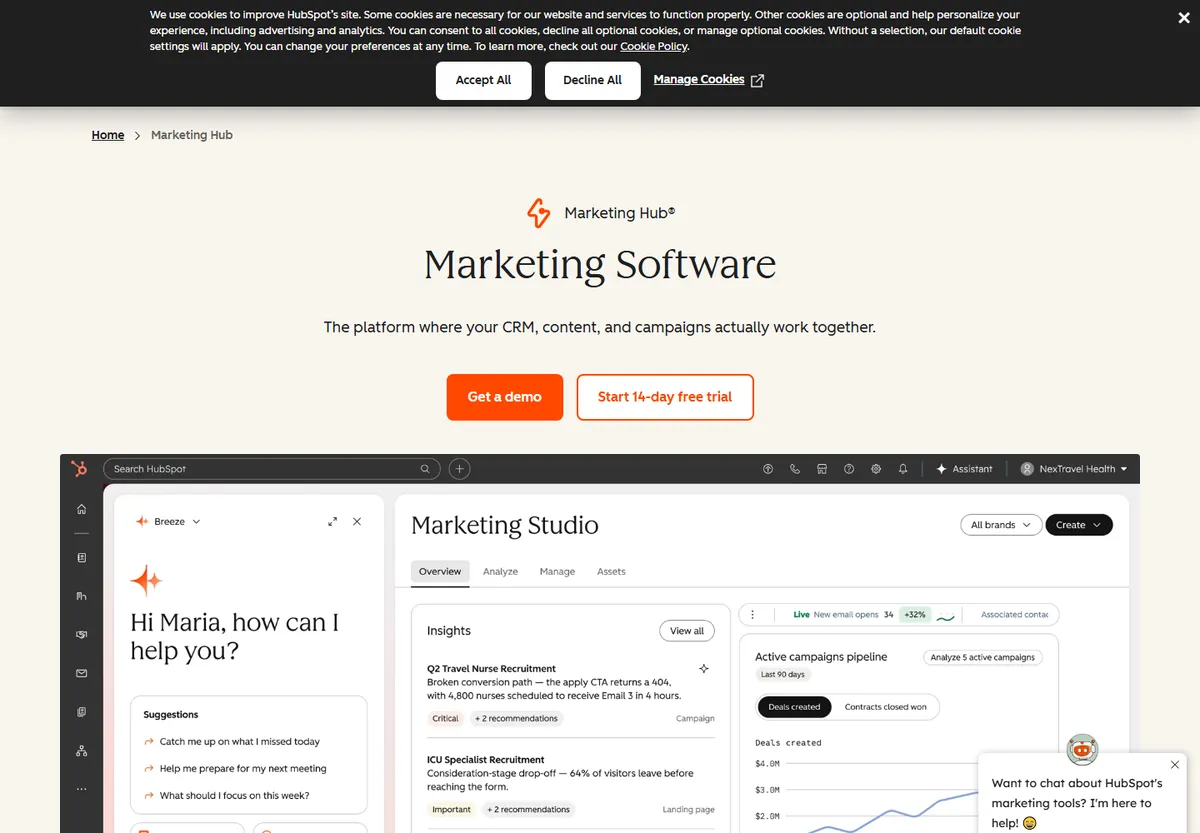
The trade-off: to unlock that loop you are paying for two hubs, and the contact tiers multiply across them. For a marketing-led B2B company it is worth it. For a lean service business, the same loop can be built for a fraction of the cost with simpler tools – which is why we keep pointing agencies to the alternatives comparison.
HubSpot CRM Pros & Cons
Pros
- Genuinely free CRM with unlimited contacts and users – one of the best free tiers in B2B SaaS.
- High user adoption: clean UI, fast onboarding, reps actually use it.
- Best-in-class content marketing stack when you add Marketing Hub.
- Huge app marketplace and mature API for integrations.
- Excellent native dashboards and reporting for standard use cases.
Cons
- Cost climbs fast with contact tiers, seats, and multiple hubs.
- Funnel building and SMS/voicemail are weaker than all-in-one platforms.
- No white-label/saas mode for agencies managing many client portals.
- Modular pricing makes the real bill hard to predict at the start.
- Heavy features can be overkill for a solo freelancer or tiny team.
Integrations & Ecosystem
HubSpot’s marketplace is one of the deepest in B2B SaaS. In practice, the connections that matter are: Gmail/Outlook for sync, Slack for alerts, Salesforce for the occasional dual-CRM setup, Zapier/Make for glue, and the HubSpot API for custom work. We have wired HubSpot into custom pipelines and it is one of the more pleasant API experiences in this category.
If your stack is already HubSpot-centric, the ecosystem compounds. If you are starting fresh, weigh whether you need that ecosystem vs the flat bundling of an all-in-one like GoHighLevel.
The Agency Rebill Play
Agencies can run a profitable rebill model on HubSpot, but it behaves differently than GoHighLevel. HubSpot does not offer white-label or multi-tenant client portals on a single subscription the way GoHighLevel does. The practical agency play in 2026:
- Per-client HubSpot hubs: spin up a separate portal per client, bill the infrastructure cost plus management markup.
- Bundle implementation: charge a setup fee for CRM build, migration, and automation design, then a monthly retain for management.
- Watch seat math: per-client Professional hubs + seats can stack to $1,000-$3,000/mo per portfolio; make sure your markup covers it.
- Compare the flat alternative: if you run 5+ client portals, GoHighLevel’s sub-account model often has a lower blended cost. See our pricing review.
Match Your Team to HubSpot or Walk Away
| Scenario | Recommendation | Why |
|---|---|---|
| B2B company with inbound content engine | Use HubSpot | Marketing Hub + CRM is a genuine growth stack |
| SMB needing an easy CRM now | Use HubSpot | Free tier is best-in-class for adoption |
| Sales team that resists data entry | Use HubSpot | Clean UI beats most CRMs on adoption |
| Agency with many client portals | Compare alternatives | Per-client hubs and seats get expensive |
| Service business wanting funnels + SMS + portals | Consider all-in-one | HubSpot lacks native funnel/SMS depth |
| Budget-sensitive solo operator | Start free, stay lean | Resist adding hubs until revenue justifies them |
HubSpot CRM FAQ
Is HubSpot CRM really free? Yes. The core CRM – unlimited contacts, unlimited users, pipelines, email tracking – is free. Paid hubs add automation, sequences, custom reporting, and higher contact tiers.
How much does HubSpot cost in 2026? Free CRM; paid hubs from roughly $15-$20/mo per seat at Starter, ~$800/mo at Professional (around 2,000 contacts), and from ~$3,600/mo at Enterprise. The real bill depends on contact band, seats, and how many hubs you run.
Is HubSpot worth it for a small agency? If you only need CRM and light marketing, yes – the free tier is excellent. If you manage many client portals and want white-label or flat pricing, compare all-in-one platforms like GoHighLevel first.
Does HubSpot have a free trial? The CRM is free forever. Paid hubs offer trial periods; we recommend testing the exact hub tier you plan to buy.
Which is better: HubSpot or GoHighLevel? For content-led B2B, HubSpot. For agencies wanting CRM + funnels + SMS + client portals at flat pricing, GoHighLevel. See our full comparison.
Can I use HubSpot and GoHighLevel together? Yes. Some teams run HubSpot for marketing content and GoHighLevel for client delivery; the added cost and integration overhead are the trade-offs.
The Break-Even Point for HubSpot CRM
If your company sells through content and needs a native CMS with reporting that satisfies a sales leader, start on the free HubSpot CRM and add a paid hub only after it proves its value. If you manage many client accounts and want funnels, SMS and portals on one flat bill, price the GoHighLevel pricing plans first. Solo operators should stay lean and check the freelancer setup guide before adding any hub.
Our recommendation: start on the free CRM, add one hub only when it pays for itself, and if you run an agency or service business that needs funnels, SMS, and client portals under one roof, price out the all-in-one path (see the GoHighLevel cost breakdown) before you let the HubSpot bill stack.
Disclaimer: We are an independent review site. Some links in this article may be affiliate links, and we may earn a commission at no extra cost to you if you purchase through them. We only recommend tools we test in real client operations. HubSpot affiliate terms were not confirmed on our network at the time of writing, so the CTA above links to the official product page.
About the Author

Antonio Vance is B2B SaaS Operations Director & Lead Reviewer (SaaSFlowLab Editorial Team). He has spent 8+ years deploying and auditing enterprise CRM, marketing automation, and email deliverability infrastructures for digital agencies. At SaaSFlowLab, he directs hands-on testing of software stacks in live production environments to deliver uncompromised, field-verified software reviews.