
Executive Summary
A solar installation company loses deals in four places: the inquiry that waits two days for a callback, the site survey that gets booked twice on the same crew, the proposal that is sent and never followed up, and the homeowner who asked in October and hears nothing until spring. GoHighLevel for solar installers connects those four points with forms, calendars, pipelines and workflows inside one account. It does not design photovoltaic systems, and it does not replace the accounting stack an EPC runs.
- Best For: residential and light-commercial solar installers running two to fifteen crews who book their own site surveys and want lead qualification, survey scheduling, proposal follow-up and reactivation in one place.
- Pricing: the plan ladder runs $97, $297 and $497 a month, or $970, $2,970 and $4,970 when paid yearly. Every plan carries usage charges for phone numbers, SMS messages, email and A2P registration on top of the base fee. A2P registration means registering the brand with the US carriers so the number is allowed to send bulk text, and a segment is one message of up to 160 characters. Those usage charges are why a crew running 250 leads a month budgets closer to $317 than the sticker price.
- Strength: the survey booking, reminder and follow-up machinery ships ready to configure, and the pipeline stage model matches how solar sales moves from inquiry to signed contract.
- Drawback: it is a CRM and automation layer, not solar design software. Layout drawing and production modeling stay in a separate tool, and usage-based phone and email charges are hard to forecast until real message volume is known.
Short on time? Jump straight to the monthly cost table and the 250-lead example.
Table of Contents
- How GoHighLevel for solar installers handles lead qualification
- How to build the solar lead intake form
- How to set up booking calendars for site surveys
- How to automate proposal follow-up without nagging
- How to reduce no-shows for site surveys
- How to handle after-hours calls and speed to lead
- How to route Facebook lead ads and purchased solar leads into GoHighLevel
- How to keep crews and sales in one pipeline
- What GoHighLevel costs a solar installation business in 2026
- How GoHighLevel scores for a solar installation business
- GoHighLevel vs solar-specific CRMs
- Where GoHighLevel falls short for solar installers
- Common problems solar installers hit in GoHighLevel
- Final Verdict
- FAQ
How GoHighLevel for Solar Installers Handles Lead Qualification
Qualification in GoHighLevel starts when a form submission or a call becomes a contact and that contact is pushed into a pipeline as an opportunity, where stage names are yours to set but the shape that matches solar sales stays small. For a solar installer the useful stages are Prospecting, Qualification, Proposal and Negotiation, with Won, Lost and Abandoned closing the record. Each opportunity carries the notes, tasks and conversation history on one card, so an appointment setter and a closer can both work the same deal without copying anything into a spreadsheet.
The qualification questions that matter for solar are not the ones a generic CRM form asks. Property ownership, roof type and shade, monthly electricity bill, whether the homeowner wants a purchase or a lease, and how soon they want the system installed decide whether a survey is worth a crew’s afternoon. Build those as custom fields and set the workflow to tag a lead as survey-ready or not-ready as soon as the form lands. A lead that fails the ownership or shade question should route to a nurture sequence instead of a calendar slot.
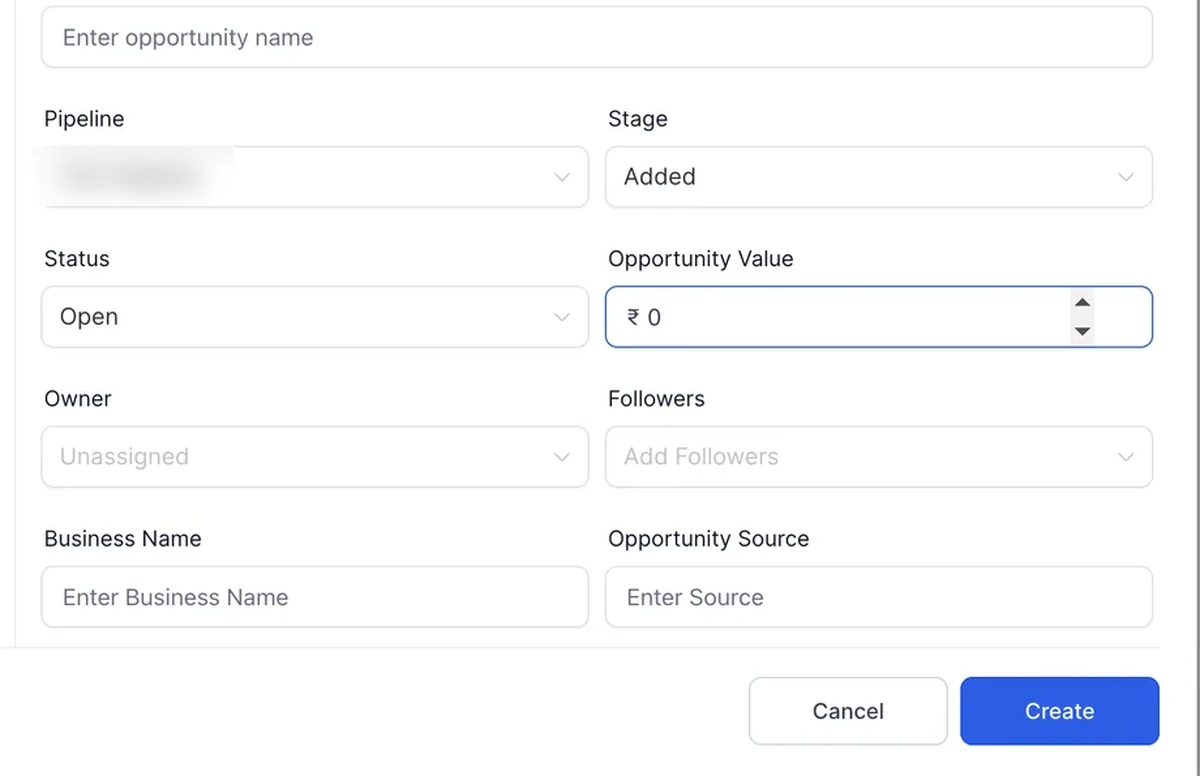
The handoff detail installers miss is that the form and the calendar are separate objects. A form submission does not book a survey by itself. You connect them, either by sending the homeowner to a booking page after submission or by triggering a workflow that creates the opportunity and sends the booking link. Decide that path before building the form, because it changes which fields are required and which can wait for the surveyor.
How to Build the Solar Lead Intake Form
A solar intake form should collect the eight fields that tell you whether sending a surveyor is justified, and nothing that only a visit can answer, because a long form costs completions and a short form costs the setter a qualification call. Name, phone, email, installation address, property ownership, roof type, monthly bill band and consent to be contacted cover the qualification decision. Anything that needs a walkthrough, such as shading measurements or panel layout, belongs on the surveyor checklist and not on the public form, so pick the split on purpose.
Consent deserves its own line on the form. Automated SMS and calls to a US homeowner need prior express consent, and A2P brand registration is a separate step before any campaign sends at volume. Capture the consent checkbox text and the timestamp with the submission, because that record is what protects the business when a homeowner disputes a message. Build this into the form at the start rather than patching it later. For the wider automation structure this form feeds into, the GoHighLevel automation setup guide covers triggers and actions in more depth.
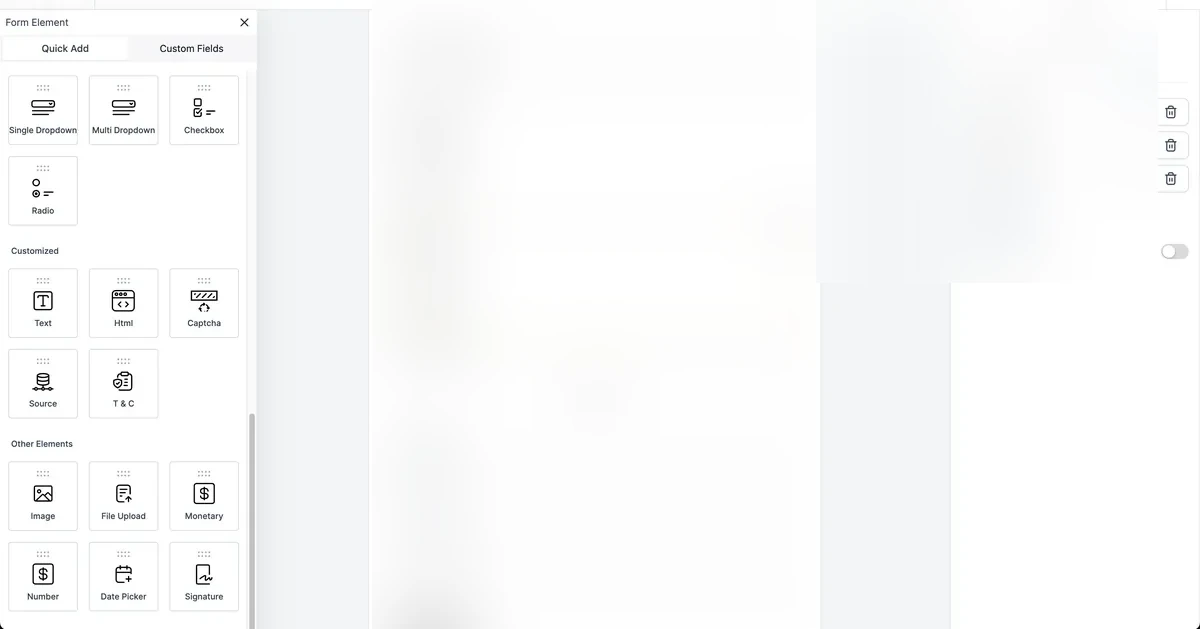
Route by location before duplicating anything. An installer covering three metro areas is tempted to build three forms, which means three places to update when the qualification rules change. A single form with a service-area field and conditional logic is easier to keep honest, and the workflow can assign the nearest crew from the address field. That one decision saves real maintenance time once the season picks up.
How to Set Up Booking Calendars for Site Surveys
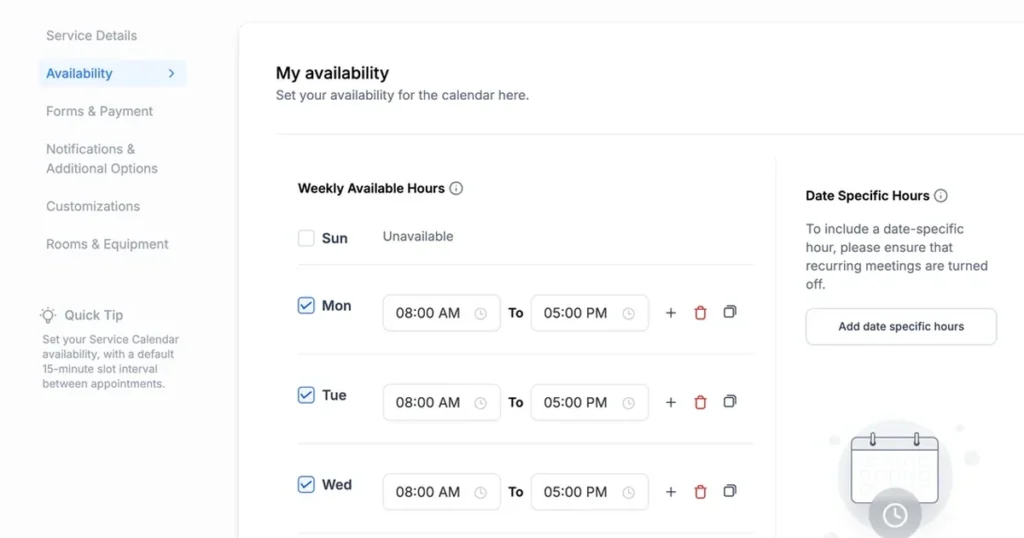
A solar installer needs at least three separate calendars, because a site survey, a proposal review call and an installation follow-up are different meetings with different time shapes, and each one takes its own slot duration, buffer and team members. Mixing them into one calendar is how a crew gets double-booked across two counties on the same morning, and it is a fixable mistake if the calendars are separated before the first booking arrives. Four settings decide whether a calendar offers any times at all, and each one is worth checking before rebuilding anything.
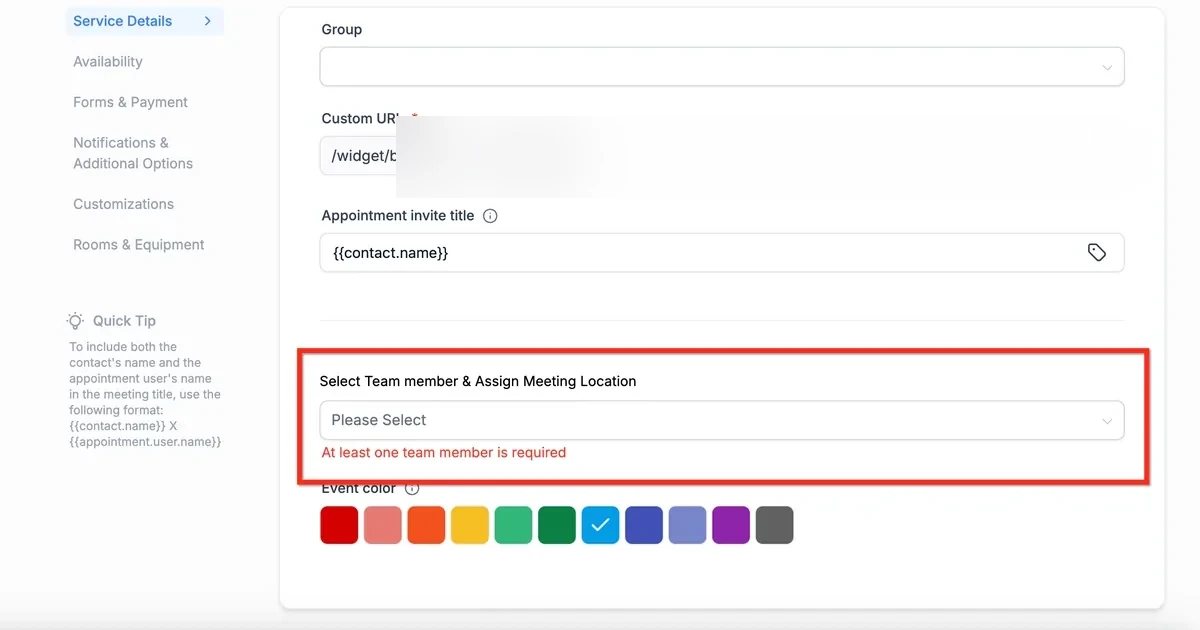
Travel time belongs in the buffer, not in the slot. Two surveys in neighboring towns need a gap between them, and that gap is a buffer setting on the calendar rather than a longer slot. The four causes are the wrong calendar being edited, slot duration and interval settings, buffer settings, and whether a team member is assigned. A calendar without an assigned team member shows no slots at all, which is the single most common reason an installer thinks booking is broken.
Capacity works differently from what most people assume. Each confirmed appointment takes one place out of the slot capacity, and an appointment that spans several slots takes a place in each affected slot. A slot only blocks once it reaches its limit. On a Saturday with two surveyors, set capacity to two and the calendar will keep taking bookings until both are filled, then stop. That behavior is worth testing before you publish the link to paid traffic.
How to Automate Proposal Follow-Up Without Nagging
Proposal follow-up is where solar deals quietly die: a quote goes out, the homeowner compares three installers and the installer who follows up with a useful message on day two and day seven usually wins the job, so the sequence has to run without feeling like pressure. Automating that sequence in GoHighLevel means triggering a workflow when the opportunity stage changes to Proposal Sent, then sending a short sequence that stops the moment the homeowner replies. Three touches across fourteen days is enough.
The sequence that works has three touches and a stop condition. Day two asks whether the numbers make sense and offers a call. Day seven adds one piece of real information, such as a financing or lease option or the local utility rebate status, without repeating the quote. Day fourteen closes the loop politely and leaves the door open. Each message also drops a reminder into the salesperson’s own task list, so someone can step in when the homeowner replies with a question the sequence cannot answer.
The three messages below are written to be copied into the workflow as they stand. Each one stays inside a single SMS segment, carries the first name variable and ends with the opt-out line that US carriers require.
| Day | Message template | Characters |
|---|---|---|
| Day 2 | Hi {{contact.first_name}}, it is the solar team. Does the quote we sent make sense, or should we walk through the numbers together? Reply STOP to opt out. | 137 with a typical first name |
| Day 7 | Hi {{contact.first_name}}, we can still hold your installation slot. Anything in the proposal still unclear? Reply STOP to opt out. | 114 with a typical first name |
| Day 14 | Hi {{contact.first_name}}, we are closing the books for this month. Still interested in solar, or should we pause? Reply STOP to opt out. | 120 with a typical first name |
Keep the opt-out wording identical in every message. A homeowner who replies STOP must drop out of the whole sequence, not just the message they answered, and that stop condition belongs on the workflow trigger rather than on each individual send.
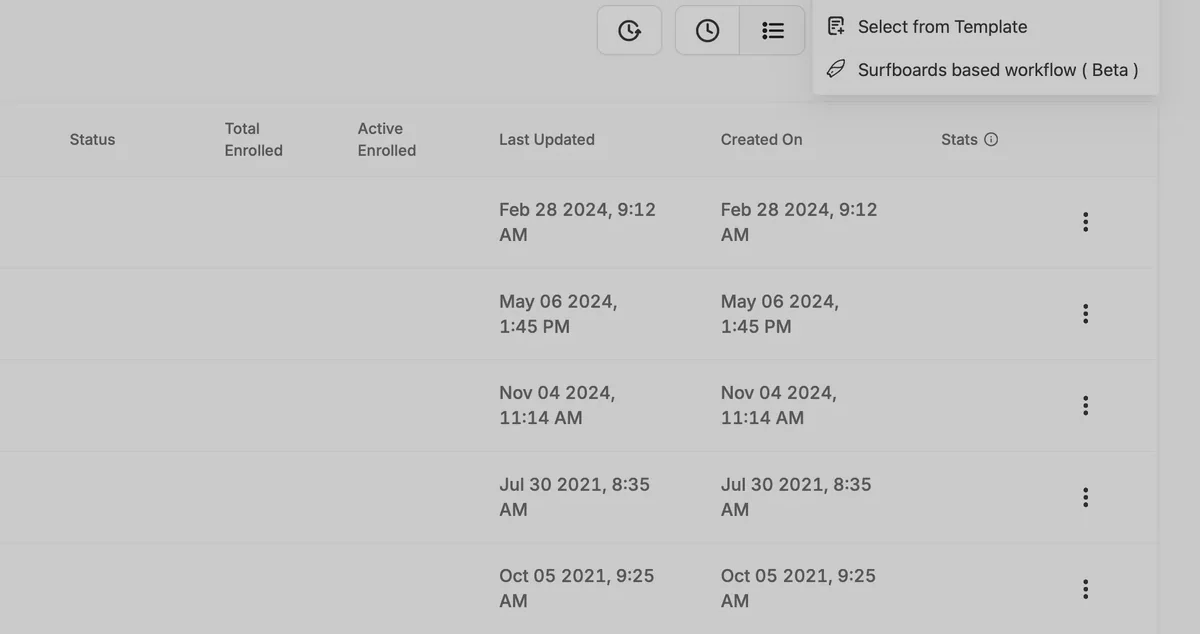
Keep the message volume sane. A homeowner who receives four texts in three days about the same quote reads it as pressure, and the reply rate drops. Two well-timed messages plus one email beat five automated nudges. If the workflow fires on a stage change, make sure the stage only changes once, or the sequence restarts every time someone edits the opportunity.
How to Reduce No-Shows for Site Surveys
A survey slot that nobody attends costs a crew half a day and a tank of fuel, which is why reminders matter more for solar than for a business that meets clients in an office, and why the notification set has to be switched on before the first booking. The appointment notification set has six types: one when the appointment is booked but not confirmed, one when it is confirmed or moved to confirmed, one for canceled, no-show or invalid appointments, one for rescheduling, one before the appointment, and one after it. Setting the first four and the before-appointment reminder covers almost every case a residential installer meets.
Notifications can be configured for the contact, a guest, the assigned user and additional email addresses or phone numbers. That matters when a spouse or a property manager is the person who will actually open the gate. Add the extra phone number at booking time and the reminder reaches the person on site. The platform also lets you set the timing of the pre-appointment reminder, so a survey booked for a weekday morning can be confirmed the afternoon before.
Two reminders cover most of the no-show risk: one the day before and one on the morning of the survey. Both fit in a single segment and both give the homeowner a way to confirm or move the visit without calling the office.
| When | Message template | Characters |
|---|---|---|
| Day before | Hi {{contact.first_name}}, your site survey is tomorrow between 9 and 11. Reply YES to confirm or call to move it. Reply STOP to opt out. | 120 with a typical first name |
| Morning of survey | Hi {{contact.first_name}}, your surveyor is on the way today. Anything we should know about gate access? Reply STOP to opt out. | 110 with a typical first name |
Wire both templates into the before-appointment notification type rather than into a separate workflow. The appointment notification already knows the booking time, so a reminder set against the appointment fires once per booking, and a homeowner who reschedules gets the reminder at the new time without anyone rebuilding the sequence.
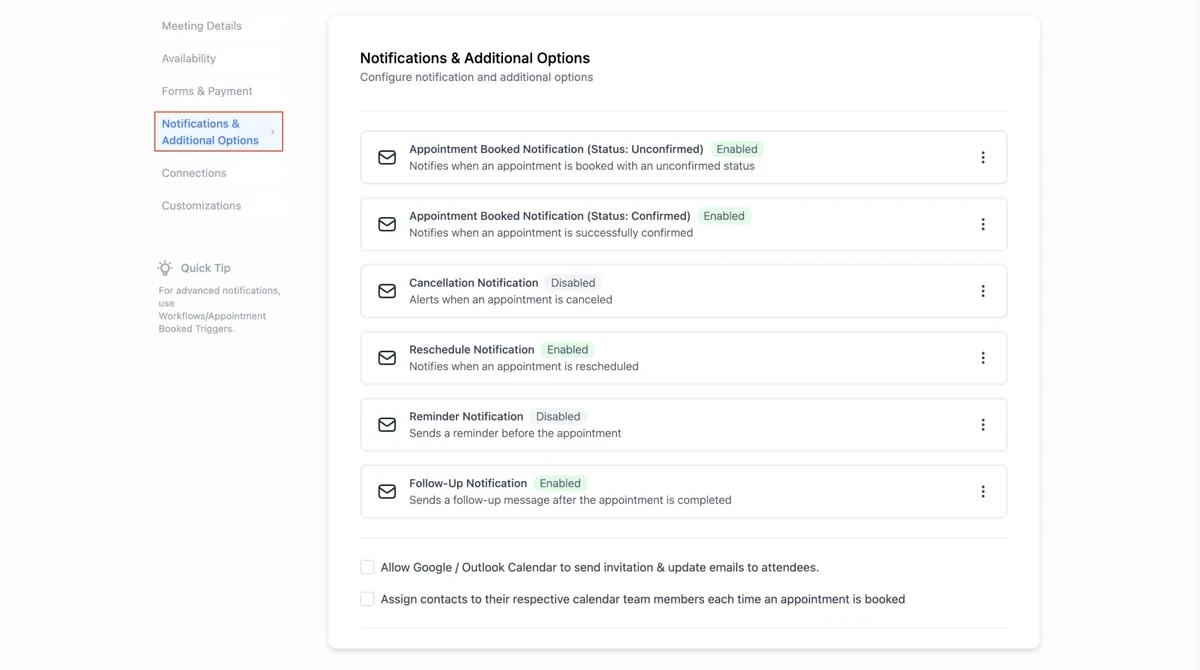
No no-show reduction figure is published for solar, so any improvement comes from the reminder mechanism itself and not from a promised percentage. An installer who tracks its own no-show rate before and after turning reminders on has a number worth quoting to peers, and that number belongs in the installer’s own reporting rather than in a marketing claim.
How to Handle After-Hours Calls and Speed to Lead
Homeowners research solar in the evening and on weekends, so a call that rings out at eight on a Sunday night is a lead that may call a competitor on Monday morning, and two settings close that gap without hiring a night shift. Missed call text back sends an automatic message when a call goes unanswered, and a voicemail drop leaves a recorded message when the caller prefers to listen rather than read. Both run inside the same number that receives the call, so the homeowner never has to look up a second contact.
Attribution needs its own tool. A call tracking number pool shows a different phone number depending on where the visitor came from, so a call that arrives after a paid search click can be tied to that campaign rather than to a generic number on the website. Choose the visitor segment to track and the pool swaps the number only for that segment. Without this, a solar installer cannot tell which channel produced the calls that turned into surveys.
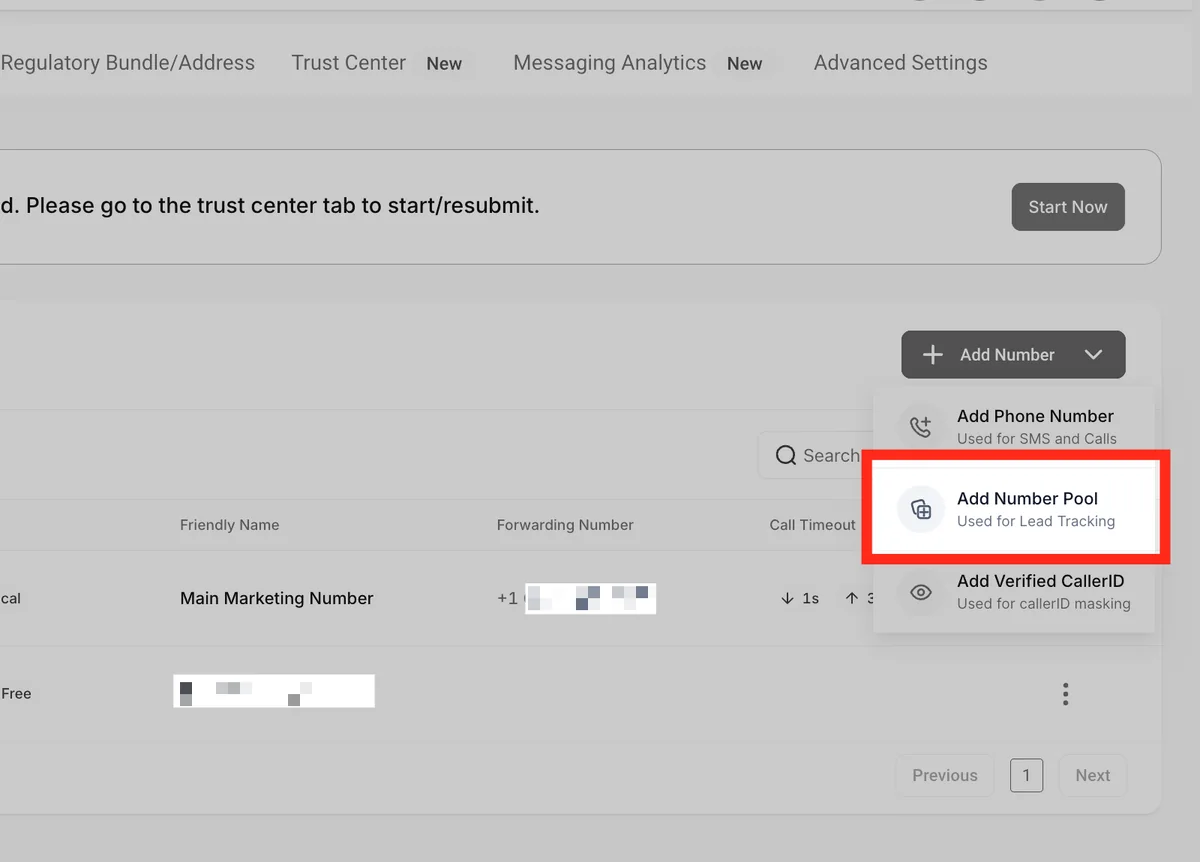
Filter the automation so it does not punish an anxious homeowner. Someone who calls three times in five minutes should receive one message, not three. A workflow condition on the number of outbound messages in the last hour keeps the sequence polite. The same condition protects against the caller who is trying to reach a specific person and keeps hitting the auto-reply.
How to Route Facebook Lead Ads and Purchased Solar Leads into GoHighLevel
Facebook lead ads and purchased solar leads arrive faster than a form fill on your own website, and both land in the same contact record once the connection is set, so the follow-up clock starts at the moment the ad click or the list upload happens instead of when someone remembers to check the inbox.
The Facebook connection runs from Settings, then Integrations, then the Facebook-Instagram card. Log into the Meta account that owns the Page, approve access to leads and page data, then pick the Page to sync. The sync choice matters more than people expect: pulling all leads brings the historical backlog in as contacts and fires the workflow for every one of them, so start with new leads only unless the backlog has already been worked. Map the form answers to the custom fields you built for property ownership and bill band, or the details land in the wrong place and the setter calls blind.
Purchased leads follow a different path. A lead vendor sends a CSV or a webhook, and the import has to carry the source name into a tag, because a bought list and an ad lead convert at different rates and only the source tag lets you see that later. Import through the contact import with the tag column mapped, or post to the API when the vendor supports webhooks so the lead arrives while the homeowner is still shopping.
Speed is the whole point of both routes. A workflow on the Facebook Lead Form Submitted trigger sends a first message within a minute and creates a call task for the setter with a five-minute due time. Tag every lead by source, Facebook, purchased, website form or referral, and the pipeline report tells you which source produced signed contracts rather than which source produced the most contacts.
How to Keep Crews and Sales in One Pipeline
Solar sales and solar installation run on different clocks: sales works in days, installation works in weeks and the handover between them is where information gets lost, so one pipeline with stages both sides understand keeps that handover visible from first inquiry to commissioning. The opportunity stays the same record across the whole run, and the appointment notes attached to a survey appear on the contact, the opportunity and the conversation at once.
Tasks carry the work between stages. When a survey is completed, the workflow moves the opportunity forward and assigns the proposal task to the salesperson. When the contract is signed, another task goes to the install coordinator with the survey notes already attached. Installers who run several crews find this structure keeps a job from sitting in one person inbox for a week. An installer group with several brands runs each brand in its own sub-account, and the GoHighLevel for agencies guide covers that structure.
Snapshot, the template that copies a configured account into a new one, has a limit to plan for before a rollout. A Snapshot copies workflows, funnels, forms, calendars, dashboards, custom fields, pipelines, tags and documents from a configured sub-account to another one. It does not copy integrations or third-party connections, and it does not copy customer records. Any asset that depends on an integration needs reconnecting after the load. Plan the reconnect step into the launch, or the first week of a new installer account will be spent fixing things that looked finished.
Got the pipeline structure set up? The next guide in this cluster covers running that pipeline across several installer accounts.
What GoHighLevel Costs a Solar Installation Business in 2026
Prices below are current as of 2 November 2026 and cover the base plans plus the usage charges a solar installer actually hits during a spring rush, because the base fee alone understates what a peak month really costs a crew running surveys across three counties. Plans are month to month with no long-term contract, and usage is billed from a prepaid balance called the agency wallet at the rate in effect when the message is sent. Each pass-through rate behind these figures is set by the carrier or the platform, so treat the usage line as a range rather than a fixed number.
Plan choice for a solar installer comes down to two questions: how many sub-accounts you need and whether you intend to resell. A single installer running one office and one survey calendar fits Starter. The moment there is a second crew, a second brand or a second location that needs its own calendars and pipelines, Unlimited becomes the cheaper answer because it removes the sub-account ceiling and lets you rebill phone and email at cost.
Founder only pays off when you resell the software to other installers with a markup on the phone and email costs. Enterprise is quoted per account, so treat any Enterprise figure as a placeholder until a quote arrives in writing.
Keep the base fee and the usage fee as two separate lines in the budget. The base fee is predictable and renews on a known date. The usage fee moves with lead volume, message length and how many channels each sequence touches, and it is the line that turns a cheap-looking plan into a larger monthly bill during the spring rush.
| Plan | Monthly | Annual | What a solar installer should know |
|---|---|---|---|
| Starter | $97 | $970 | 3 sub-accounts, unlimited contacts and users. Enough for one installer with one office and no rebilling. |
| Unlimited | $297 | $2,970 | Unlimited sub-accounts, phone and email rebilling without markup, basic API. Fits two to five crews. |
| Founder | $497 | $4,970 | Rebilling with markup, Founders Club and partner network. Only needed when reselling to other installers. |
| Enterprise | Custom | Custom | Quoted per account. No published price, so budget from a quote rather than a guess. |
Numbers work for your crew count? Start on Unlimited and measure the message volume before committing to a year.
Usage is the part that surprises people. A local number costs $1.15 a month and a toll-free number $2.15. SMS is $0.00747 per segment in both directions, with carrier fees on top: AT&T $0.0035 per message each way, T-Mobile $0.0045 out and $0.0025 in, Verizon $0.0050 out and $0.0070 in. MMS runs $0.0220 per segment out. Email is $0.675 per thousand. A2P registration for a low-volume brand is $22.50 once plus $1.50 to $10.50 a month.
Work the example for an installer running 250 leads a month with two crews. Each lead receives four messages at an average of 1.5 segments, so 1,500 segments go out and 150 come back in; at AT&T carrier rates each way and 1,200 emails at $0.675 per thousand, with one local number on Unlimited, the month lands at $317.06, which is $1.27 per lead. Add A2P registration in the first month, and the total reaches $350.06 at the top of the low-volume monthly band. A 20 percent swing on the plan price moves the total between $257.66 and $376.46, while the usage side stays tied to real lead volume.
Compare the plan ladder on the same usage. Starter lands at $117.06, Founder at $517.06. If twelve signed contracts in the month average $18,000 each, the software cost is 0.15 percent of revenue. For a solar installer choosing between plans, that ratio is why the software bill is not the constraint in this trade; the constraint is response speed on the first inquiry and conversion after the survey. For the full plan comparison across every tier, the GoHighLevel pricing breakdown goes deeper.
How GoHighLevel Scores for a Solar Installation Business
Scoring uses the weighted method this site applies to every platform review: CRM depth 25 percent, automation 25 percent, funnel 20 percent, deliverability 15 percent and value for money 15 percent, and the table below shows how each score produces the total. Applied to a residential solar installer, the platform earns high marks on automation and funnel because the booking, reminder and follow-up machinery comes prebuilt and you only connect it to your calendars and forms. CRM depth is strong for the sales side and thinner for the project side, since installation scheduling and commissioning tracking are not what the pipeline was designed for.
| Criterion | Weight | Score for a solar installer | Why the score lands there |
|---|---|---|---|
| CRM depth | 25% | 8.5 / 10 | Custom fields, tags, pipelines and appointment records carry the sales front office. Installation scheduling and commissioning sit outside the pipeline. |
| Automation | 25% | 9.0 / 10 | Booking triggers, survey reminders, no-show branching and proposal follow-up sequences come prebuilt and you configure them from templates. |
| Funnel | 20% | 8.5 / 10 | Forms, calendars and pages attach to each appointment type, so a survey request and a proposal call run on separate paths. |
| Deliverability | 15% | 7.5 / 10 | LC Email and LC Phone work, but A2P registration and dedicated domain warm-up are prerequisites before volume goes up. |
| Value for money | 15% | 8.0 / 10 | $1.27 per lead at 250 leads on Unlimited is low against contract value, though usage and add-on layers grow with volume. |
| Weighted total | 100% | 8.4 / 10 | 25% x 8.5 + 25% x 9.0 + 20% x 8.5 + 15% x 7.5 + 15% x 8.0 = 8.40. |
Deliverability is the weakest of the five for this use case. Email sending through the platform’s own email service is billed per thousand and the sending reputation is shared across every sub-account on the plan, so an installer sending proposal follow-ups from a sub-account should set up a dedicated sending domain and warm it before a campaign. Value for money lands in the middle: the base plan is inexpensive against the revenue per signed contract, but the usage and add-on layers add up once AI employees or premium workflow actions are switched on.
Weighted total for a solar installer: 8.4 out of 10. The score reflects fit for the sales and booking workflow, not fit for engineering or accounting. An EPC running utility-scale projects will find the project management side too thin and should keep its existing system.
GoHighLevel vs Solar-Specific CRMs: Which One Fits Your Installer Business?
Solar-specific CRMs and GoHighLevel solve different halves of the same problem: the dedicated platforms carry design, permitting and financing inside one system, while GoHighLevel carries the lead conversation and the follow-up that surrounds it, so the right answer depends on which half is currently costing you signed contracts.
| Platform | Best fit | Strong at | Weak at |
|---|---|---|---|
| GoHighLevel | Residential and light-commercial installers losing deals to slow callbacks and missed survey appointments | Lead capture from ads and purchased lists, missed call text back, survey booking and reminders, proposal follow-up sequences, one pipeline from inquiry to signed contract | Roof layout, shading analysis, production modeling, interconnection paperwork and progress billing stay in other systems |
| SolarNexus | Contractors who want design, quoting and project workflow in one industry tool | Array design from aerial imagery, hourly energy modeling, proposal and contract templates, project task assignment | Lead nurture and multi-channel follow-up are thinner than a dedicated marketing automation layer |
| Enerflo | US residential dealers and installers running a high volume of financed deals | Sales process from door knock to PTO, document signing, lender integrations, customer portal | Availability is limited to US residential companies, and marketing automation sits outside the core |
| Arka360 | Installers selling storage and commercial projects alongside residential PV | Solar CRM plus design, simulation, permit packages and business analytics in one platform | Deep conversation automation and missed call handling are not the centre of the product |
Choose GoHighLevel when the deals you lose are lost before the survey: the lead waits too long for a callback, the survey slot is booked twice or nobody reminds the homeowner, and the quote goes out without a follow-up sequence behind it. Choose a solar-specific CRM when the work you lose is lost after the survey, in design revisions, permit resubmissions or financing paperwork. A larger installer often runs both, with GoHighLevel as the front office that hands a qualified, surveyed lead to the design and project system.
Where GoHighLevel Falls Short for Solar Installers
The clearest limit for a solar installer is design: GoHighLevel does not draw a roof layout, model production or produce a shading report, and those tasks belong to dedicated photovoltaic design tools that no amount of workflow automation replaces in one account. An installer who expects one platform to handle design and CRM will end up with two systems anyway, so plan the split before the rollout and budget for both.
Accounting and project delivery sit outside the core as well. Invoicing and payments exist, but a solar EPC with progress billing, change orders and interconnection paperwork needs a proper accounting system. The platform works as the front office that feeds that system, and pretending otherwise creates reconciliation work every month.
Cost predictability is the third limit. Usage charges depend on message volume, and volume depends on lead volume, which moves with the season. An installer entering the spring rush should model the message bill at peak rather than at the January rate. Add-on charges for premium workflow actions sit outside the base plan and are easy to overlook in a first-year budget.
Common Problems Solar Installers Hit in GoHighLevel
The most common failure is a workflow that never fires, and most cases trace to a trigger that does not match the event, a published state that was never switched on, or a filter that excludes the contact that should have started the run. Check the trigger event against the record that should have started it before rebuilding anything. The automation not running fix guide walks through the diagnostic order that saves the most time.
The second is a calendar with no visible slots. The cause is usually one of four settings: the wrong calendar was being edited, the slot duration or interval does not fit the working hours, the buffer removed every available gap, or no team member was assigned. Assign the surveyor first, then adjust duration and buffer, then republish the calendar link.
The third is a Snapshot that looks complete and is not. Integrations and customer records do not transfer, so a freshly loaded sub-account needs its connections reauthorized and its data imported. Build a short checklist for every Snapshot load and the launch stops depending on one person’s memory.
The fourth is message volume that reaches the carrier limits. A campaign that sends thousands of segments in a day needs the high-volume A2P tier, and a brand that registered as a sole proprietor cannot send at that rate. Register the brand at the tier that matches the peak month, not the average month.
Final Verdict
GoHighLevel for solar installers fits a residential or light-commercial company that books its own surveys and wants lead qualification, survey scheduling, reminders and proposal follow-up inside one account, and the pipeline model matches how solar sales actually moves from inquiry to signed contract. The survey calendar handles travel buffers and crew capacity without double-booking two counties on the same morning, and the monthly cost stays near $1.27 per lead at 250 leads on the Unlimited plan. For an installer whose bottleneck is speed to lead and survey attendance, the platform addresses the real problem rather than a cosmetic one.
It does not fit an EPC that needs photovoltaic design, interconnection tracking and progress billing in one system. Those businesses should keep their engineering and accounting stack and use GoHighLevel only for the sales front office. Choose Unlimited once there is more than one crew or more than one installer account to manage. Starter is enough for a single office running a single calendar.
If the verdict fits your setup, this is the fastest way to start.
FAQ
How do solar installers qualify leads in GoHighLevel?
A GoHighLevel for solar installers setup captures ownership status, roof type, bill band and purchase preference as custom fields on the intake form, then uses a workflow to tag the lead as survey-ready or not-ready. Qualified leads move into the pipeline as opportunities and get a booking link; the rest go to a nurture sequence instead of a crew calendar.
Can GoHighLevel book site surveys without double-booking crews?
Yes, when each crew has its own calendar with an assigned team member. Slot duration, interval and buffer control the spacing, and each confirmed appointment reduces slot capacity by one, so a slot stops taking bookings once its limit is reached. Nothing appears on the booking page until a team member is assigned to that calendar.
How do I automate proposal follow-up for solar quotes?
Set the trigger on the Proposal Sent stage change, then send three touches across fourteen days with a stop condition on reply. Each touch assigns the rep a follow-up task so a person can answer technical questions. Make sure the stage changes once per deal, or the sequence restarts on every edit.
How much does GoHighLevel cost for a solar company?
Monthly plans cost $97, $297 and $497, and yearly billing takes ten months at $970, $2,970 and $4,970. Usage sits on top: $1.15 for a local number, $0.00747 per SMS segment each way plus carrier fees, and $0.675 per thousand emails. The 250-lead month worked through above lands near $317.06 on Unlimited, or $350.06 in the first month with A2P registration.
Does GoHighLevel replace solar design software?
No. It is a CRM and automation layer. Roof layout drawing, shading analysis and production modeling stay in dedicated photovoltaic design tools. GoHighLevel holds the lead record, the survey booking, the proposal follow-up and the pipeline stage, and it hands the technical design work to the design tool.
Is there a GoHighLevel snapshot built for solar installers?
Yes, as part of a paid bundle. HighLevel sells a Solar Playbook Bundle on its own website that includes a done-for-you solar snapshot, a website template, an offer funnel, prebuilt workflows and forms. The public Snapshot library lists Chiropractor and Dentist snapshots but no solar one, so the solar snapshot only comes with that paid bundle and is not a free library download.
What happens when a solar lead calls after hours and nobody answers?
The system replies by text as soon as the call is missed, day or night, and that reply lands in the conversations inbox. A workflow condition caps it so a homeowner who calls three times in five minutes gets one message rather than three.
Still deciding after the FAQ? Open a free account and check it against your own survey calendar.
← Previous: GoHighLevel for Home Services: Complete Guide for Home Service Businesses (2026)
Next →: GoHighLevel for Agencies: Sub-Accounts, White Label & SaaS Mode
About the Author

Antonio Vance is B2B SaaS Operations Director & Lead Reviewer (SaaSFlowLab Editorial Team). He has spent 8+ years deploying and auditing enterprise CRM, marketing automation, and email deliverability infrastructures for digital agencies. At SaaSFlowLab, he directs hands-on testing of software stacks in live production environments to deliver uncompromised, field-verified software reviews.
We are an independent review site. Some links in this article are affiliate links, and we may earn a commission at no extra cost to you if you purchase through them.
Surveys booked, crews showing up?