
Executive Summary
Plenty of reviews insist GoHighLevel is a beast nobody outside a dev team can tame. That verdict confuses breadth with difficulty. Booking a calendar, adding contacts, or publishing a template page takes a single day; the steep part only arrives when you reach multi-step workflows, domain authentication, and the agency-versus-sub-account hierarchy. So is GoHighLevel hard to use? Moderately, not impossibly — beginners usually become productive within about a month, while agencies need one to three months to exploit sub-accounts and white labeling.
If you are trying to decide whether the platform is worth the effort, the short version is this: for a solo business owner who only needs bookings and simple reminders, GoHighLevel is more software than you need. For an agency that wants CRM, funnels, email, SMS, websites, and client portals in one place with white-label economics, it is the strongest option in 2026 – and the learning curve is the price you pay for that consolidation. See our GoHighLevel pricing review 2026 before you commit.
Table of Contents
- The Short Answer: Is GoHighLevel Hard to Use?
- Why GoHighLevel Feels Overwhelming
- What Is Actually Easy
- What Is Actually Hard
- GoHighLevel Learning Curve Timeline
- GoHighLevel vs HubSpot vs ActiveCampaign
- Beginner Setup Checklist (First 7 Days)
- 7 Tips to Cut the Learning Curve in Half
- FAQ
- Final Verdict
The Short Answer: Is GoHighLevel Hard to Use?
GoHighLevel is moderately hard to learn, not impossible. If you are comfortable with CRMs, automation, and multi-step workflows, the platform is manageable and rewarding. If you have never used a marketing automation tool, the number of menus and options can feel intimidating for the first week or two. The good news: you do not need to learn everything. You only need one outcome at a time, and HighLevel Academy + pre-built templates shorten the curve dramatically.
A quick difficulty breakdown for different users: beginners find it steep at first but become productive in about a month; digital marketers adapt within 1-2 weeks; agencies need 1-3 months to fully exploit sub-accounts, workflows, and white labeling; developers can use the API and SaaS mode after the same mastering phase. Compare this with other tools in your stack by reading our GoHighLevel alternatives guide.
Why GoHighLevel Feels Overwhelming (5 Real Reasons)
Most people do not quit GoHighLevel because it is impossible – they quit because it is broad. Here are the five reasons it feels hard, all of which are avoidable with the right approach:
- It replaces an entire stack. Instead of learning one tool, you are learning CRM + funnel builder + email + SMS + automation + websites + client portal at once.
- Two account layers. Agencies must understand the agency account vs sub-account hierarchy before the UI makes sense.
- Workflow builder is powerful but dense. Triggers, conditions, and multi-step actions take focused practice.
- Email deliverability setup. SPF/DKIM, custom domains, and sending limits require technical care.
- No single obvious path. With dozens of features, beginners do not know what to configure first.
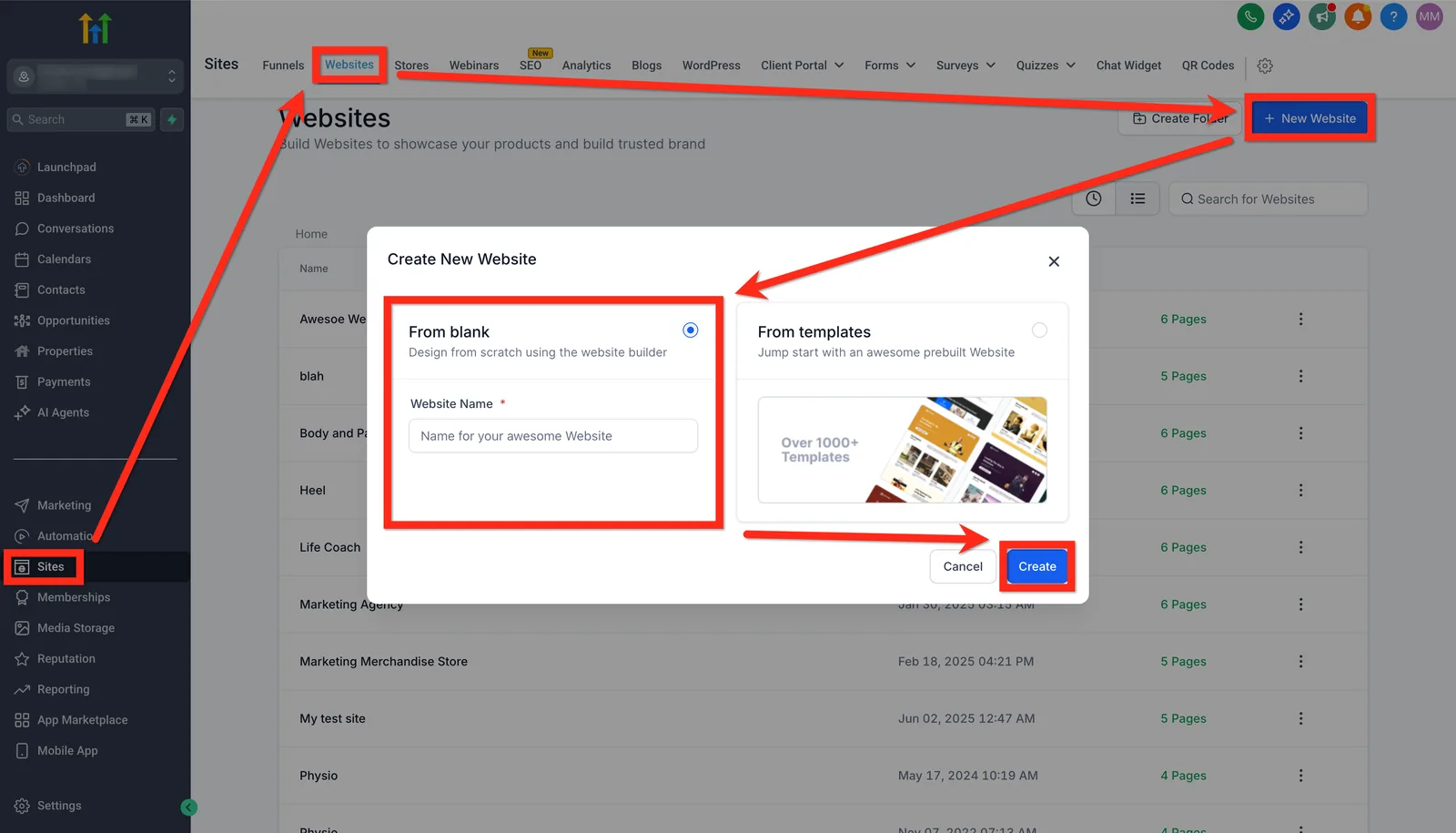
The good news is that none of these are permanent blockers. The first two reasons are conceptual (you can learn them in a day), the workflow builder is a skill you build with templates, and email deliverability is a one-time configuration you can set up once.
What Is Actually Easy (You Can Learn in Day One)
Despite the breadth, several core tasks are genuinely simple in GoHighLevel and work the same way as most modern SaaS tools:
- Signup: the 14-day trial requires no credit card.
- Calendar and booking: create a calendar, set availability, share a link.
- Contacts and pipelines: add contacts, move deals between stages visually.
- Landing page builder: use a template, drag-and-drop sections, publish in minutes.
- Pre-built snapshots: import an entire agency-ready setup from the marketplace.
If your goal is just appointment booking or a simple contact form, you can be live on your first day. The platform does not force you to use the complex features – they are there when you need them.
What Is Actually Hard (Honest Difficulty Map)
The parts that deserve real respect are the automation and delivery layers:
- Multi-step workflows: triggers, conditions, time delays, and branching logic are where most users get stuck.
- Email deliverability: authenticating your domain, choosing sending infrastructure, and maintaining inbox rates.
- Agency hierarchy: managing sub-accounts, user roles, and white-label settings is not a beginner task.
- Snapshots and SaaS mode: packaging and reselling HighLevel requires systematic training.
- Migration: if you are moving from another CRM, importing clean data is a project by itself.
Do not try to learn all of this at once. Pick one workflow – for example, new lead → booking → follow-up email – and build it end to end. Once that works, expand. That single habit removes most of the overwhelm.
GoHighLevel Learning Curve Timeline (Week by Week)
Based on user reports across the community and our own onboarding tests, here is a realistic timeline for 2026:
| Stage | What You Can Do | Difficulty |
|---|---|---|
| Day 1-2 | Account setup, calendar, basic contacts, first landing page | Easy |
| Week 1 | Pipelines, funnel, simple email automation | Moderate |
| Week 2-4 | Workflows, triggers, templates, sub-accounts | Steep |
| 1-3 months | Client portals, white label, full stack replacement | Steep |
| 3-6 months | Complex automations, SaaS mode, reselling at scale | Mastery |
The biggest jump happens between week 1 and week 2, when you move from single features to automation. That is also the point where most users either commit or quit. Use HighLevel Academy (official free training) to smooth that jump, then practice with a real mini project.
GoHighLevel vs HubSpot vs ActiveCampaign: Ease of Use
A common question is whether GoHighLevel is harder than the tools it competes with. The honest comparison: HubSpot has a gentler guided onboarding for pure CRM, but Marketing Hub gets expensive and complex at higher tiers. ActiveCampaign has a simpler email/automation builder for email-first teams, but it lacks funnels, websites, and sub-accounts entirely. GoHighLevel bundles more tools natively, which is exactly why the initial curve is steeper.
| Platform | Initial Difficulty | Time to First Win | Total Scope |
|---|---|---|---|
| GoHighLevel | Moderate-Steep | 1-2 days (booking/funnel) | Full all-in-one stack |
| HubSpot | Gentle | Same day (CRM) | CRM + Marketing tiers (priced separately) |
| ActiveCampaign | Moderate | 1-2 days (email) | Email + automation only |
If your priority is pure CRM with friendly onboarding, HubSpot is easier to start. If email automation is your only need, ActiveCampaign is simpler. If you want one platform for a full agency engine, GoHighLevel has the highest ceiling – and the highest starting learning investment. Read our GoHighLevel vs HubSpot vs ActiveCampaign comparison for the full breakdown, or check the CRM reviews and marketing automation guides.
Beginner Setup Checklist (First 7 Days)
This is the exact order we recommend for a new user. Follow it and you will have a working system before the learning curve scares you:
- Day 1: create your account, set up your sub-account, add your business name and logo.
- Day 2: build your calendar and connect it to your booking link.
- Day 3: import your contacts (CSV or manual) and create two pipeline stages.
- Day 4: pick one landing page template and publish a simple lead-capture page.
- Day 5: create one email automation (new lead → welcome email).
- Day 6: connect your custom domain for email sending (SPF/DKIM) if you own one.
- Day 7: run a test lead through your booking + email flow and fix any gaps.
That is about one hour per day for a week. By day 7 you will have a real, working system – and you will understand 80% of what GoHighLevel can do.
7 Tips to Cut the Learning Curve in Half
- Start with HighLevel Academy. The official free training is the fastest structured path.
- Use the snapshot marketplace. Import a pre-built agency setup instead of building from zero.
- Learn one outcome at a time. Booking first, then automation, then funnels.
- They cover almost every feature with screenshots.
- Join the community. Search the GHL forums and Reddit for real-world fixes.
- Use the 14-day trial deliberately. Treat it as a mini project, not a tour.
- Book support when stuck. Live chat and account managers answer fast for active users.

The biggest mistake beginners make is trying to configure everything before running anything. Pick the smallest useful flow, launch it, get a real lead, then expand. Momentum beats perfection.
GoHighLevel Difficulty FAQ
Is GoHighLevel hard to learn? It is broader than it is hard. Simple features (calendar, contacts, landing pages) are easy on day one; workflows and sub-accounts take 2-4 weeks of practice. Most users reach functional proficiency within a month.
Do I need to be technical to use GoHighLevel? No. You need patience and a willingness to follow tutorials. The workflow builder has a visual drag-and-drop interface; you do not need to write code. Technical users can go further with the API and SaaS mode.
How long does it take to learn GoHighLevel? Plan for 2-4 weeks of daily use for functional proficiency, and 3-6 months for advanced mastery of complex automations and reselling. A focused week with the checklist above gets you to a working system.
Is GoHighLevel easier than HubSpot or ActiveCampaign? HubSpot is gentler for pure CRM onboarding; ActiveCampaign is simpler if you only need email automation. GoHighLevel is broader, so the initial curve is steeper – but it replaces multiple tools in one subscription.
Is GoHighLevel worth the learning curve? Agencies and service businesses seeking a single home for client management, landing pages, messaging, and branded client portals will find the fit strong. If you only need one feature, a single-purpose tool is cheaper and easier. See our pricing guide for the cost side.
Final Verdict
Is GoHighLevel hard to use in 2026? The honest answer: it is hard only if you try to learn it all at once. If you follow a structured path – one outcome per week, templates instead of blank screens, and official training when stuck – the platform becomes significantly easier than its reputation suggests. For agencies and service businesses that want to consolidate their entire marketing stack, the 2-4 week investment pays for itself quickly.
If you are on the fence, the smart move is to test it with a real mini project using the 14-day free trial before you commit. You can also read our GoHighLevel alternatives to make sure no lighter tool fits your needs first.
Disclaimer: We are an independent review site. Some links in this article are affiliate links, and we may earn a commission at no extra cost to you if you purchase through them. We only recommend tools we test in real client operations.
About the Author

Antonio Vance is B2B SaaS Operations Director & Lead Reviewer (SaaSFlowLab Editorial Team). He has spent 8+ years deploying and auditing enterprise CRM, marketing automation, and email deliverability infrastructures for digital agencies. At SaaSFlowLab, he directs hands-on testing of software stacks in live production environments to deliver uncompromised, field-verified software reviews.