
Executive Summary
GoHighLevel wins for agencies that need CRM, funnels, email, SMS, and automation under one flat rate, while ClickUp wins for internal teams that live in tasks, docs, and project views. This GoHighLevel vs ClickUp breakdown is for the owner who bills clients and needs a pipeline that talks to a landing page, and it is not for the team whose main job is moving cards across a sprint board. Read on to see where each platform earns its monthly bill.
- Best For: agencies and growing businesses that want CRM, funnels, email, SMS, and automation inside one system (GoHighLevel); teams that want a unified project management, docs, and productivity hub with generous free automation (ClickUp).
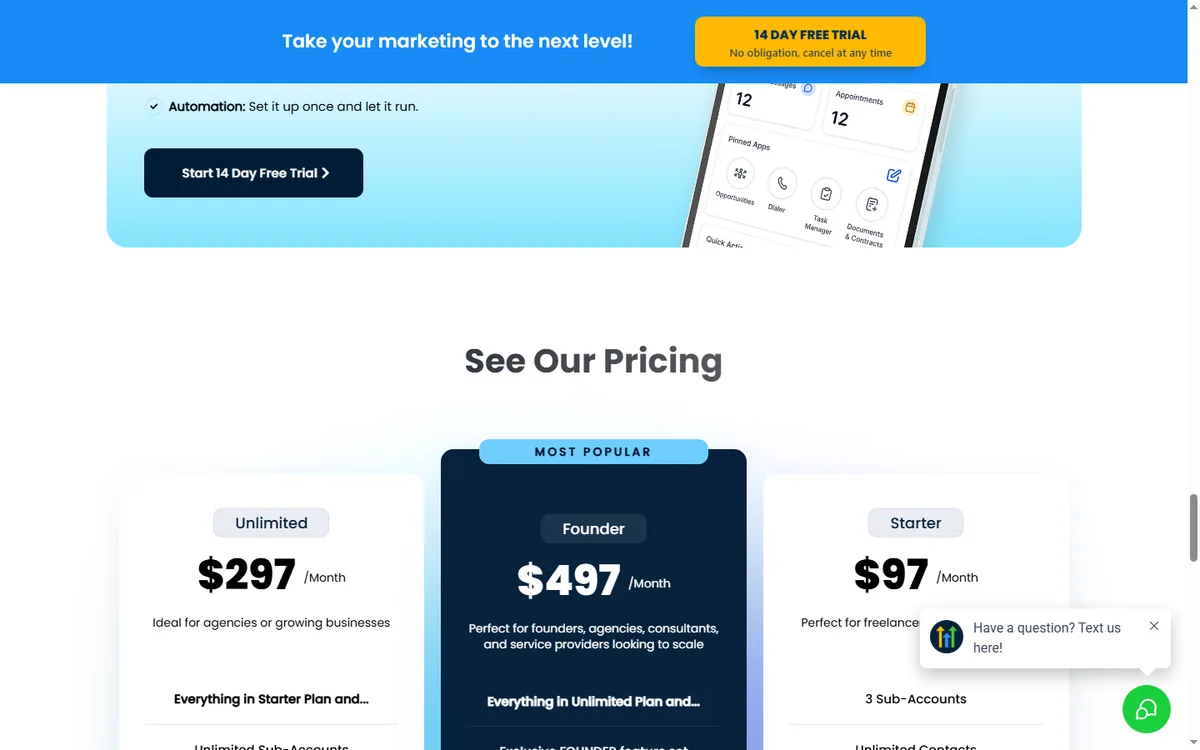
- Pricing: GoHighLevel $97/$297/$497 per month with unlimited contacts and seats; ClickUp starts Free forever, Core at $9/user/month, Business at $17/user/month (billed yearly).
- Strength (GHL): native CRM, funnels, email, SMS, and automation in one flat-rate platform with unlimited contacts.
- Strength (ClickUp): flexible tasks, docs, goals, whiteboards, and automations with a strong free plan and per-user pricing.
Below we compare both platforms across pricing, CRM and sales features, project management and docs, automation, integrations, funnels and marketing, agency use cases, and learning curve, then give a clear verdict for different buyer profiles. For a closer look at how the two platforms stack up on scheduling and pricing, see this comparison of GoHighLevel vs Acuity Scheduling.
Table of Contents
- Agency Operations vs Internal Project Work
- Two Buyer Mindsets, One Decision
- CRM and Funnels vs Tasks and Docs
- GoHighLevel vs ClickUp Pricing Compared
- CRM and Sales Workflow
- Build a Lead-to-Booking Flow in GoHighLevel
- Two Scenarios That Show the Split
- Project Management and Docs
- Automation Capabilities
- Integration Ecosystem
- Funnels, Email, and SMS
- Agency and Multi-Client Use
- Onboarding Time for a Solo Operator vs a Team
- Match the Platform to Who Owns the Work
- Where GoHighLevel Pulls Ahead
- FAQ
- The Platform That Fits Your Client Load
Agency Operations vs Internal Project Work
If you run an agency or a growing business that needs a full operating system with CRM, marketing, and delivery, GoHighLevel is the stronger platform: your funnels, email, SMS, and pipeline live in one place with unlimited contacts. If your team needs a flexible project management and productivity hub with tasks, docs, goals, and automations, ClickUp is excellent, especially with its generous free plan. In 2026, the deciding factor is whether you need a complete client-operations and marketing engine (GoHighLevel) or a productivity and project management workspace (ClickUp).
Two Buyer Mindsets, One Decision
ClickUp suits the operator whose calendar is built around internal delivery. The sales motion is a project kickoff, a design review, a sprint retro. Budget logic follows headcount, so a five-person team on Business pays about $85 per month and a ten-person team pays about $170. The tool owner is usually an operations lead or a project manager, and success is measured in on-time delivery, not lead conversion.
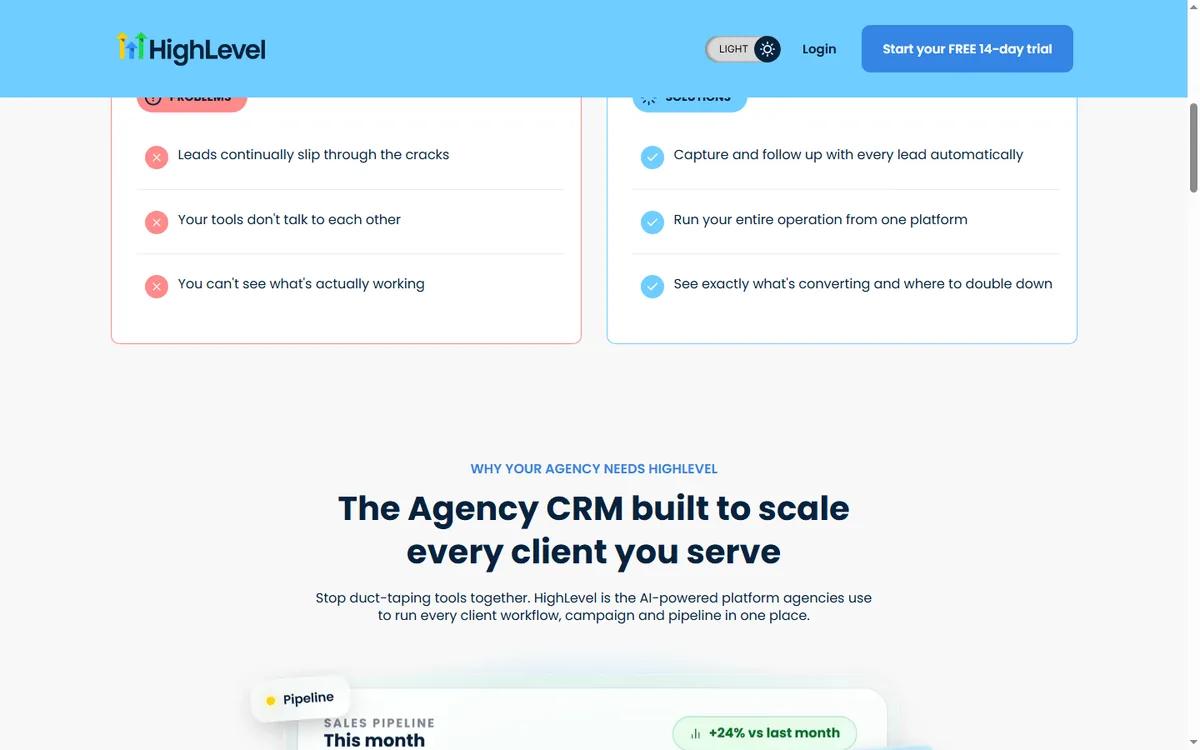
GoHighLevel fits the operator whose calendar is built around client acquisition. The sales motion is external: a lead fills a form, gets a text, books a call, and lands in a pipeline. Budget logic is flat, so $97 covers unlimited contacts and seats on Starter, and $297 unlocks unlimited sub-accounts on Unlimited. The tool owner is the agency owner or the marketing lead, and success is measured in booked appointments and closed deals.
Each mindset breaks down at the edges. ClickUp breaks when you ask it to send an SMS follow-up to a lead who abandoned a funnel, because it has no native SMS or funnel builder and you would stitch in a separate email service and SMS tool. GoHighLevel breaks when you ask it to run a Gantt chart with dependencies for a twelve-person design team, because it is not a general-purpose project management hub.
The honest read is that these tools solve different jobs. If your calendar is full of internal standups, ClickUp keeps the work visible. If your calendar is full of client onboarding calls, GoHighLevel keeps the pipeline moving. Owners who try to force one tool into the other’s job end up paying for both anyway. For a deeper look at how GoHighLevel stacks up against another CRM, see our GoHighLevel vs HubSpot comparison.
CRM and Funnels vs Tasks and Docs
ClickUp is a project management platform that unifies tasks, docs, goals, whiteboards, chat, dashboards, and automations in one workspace. It has a strong free forever plan, and paid plans are per user per month: Free $0, Core $9, Business $17, Enterprise custom (billed yearly). ClickUp Brain adds AI credits, and automation limits scale from 1K per month on Core to 10K on Business.
GoHighLevel is an all-in-one platform for agencies and SMBs. It includes a full CRM with pipelines and custom fields, funnels and websites, email marketing, SMS, call tracking, phone, voice AI, surveys, reputation management, and automation workflows. It is designed to run client operations end to end, with automation built around the same contacts and pipelines you already manage.
GoHighLevel vs ClickUp Pricing Compared
| Plan | Monthly Price | Key Limits | Best For |
|---|---|---|---|
| GoHighLevel Starter | $97/month | 3 sub-accounts, core CRM, funnels, email, SMS, unlimited contacts | SMBs |
| GoHighLevel Unlimited | $297/month | Unlimited sub-accounts, full funnels + websites + phone | Agencies |
| GoHighLevel Agency Pro | $497/month | SaaS mode, whitelabel, advanced features | Reselling agencies |
| ClickUp Free Forever | $0 | Unlimited tasks, docs, kanban, calendar, 100 automations | Individuals and small teams |
| ClickUp Core | $9/user/month | Custom fields, unlimited storage, 1K automations, goals | Growing teams |
| ClickUp Business | $17/user/month | Advanced dashboards, 10K automations, resource management | Scaling teams |
| ClickUp Enterprise | Custom | White labeling, 1M automations, advanced security | Large orgs |
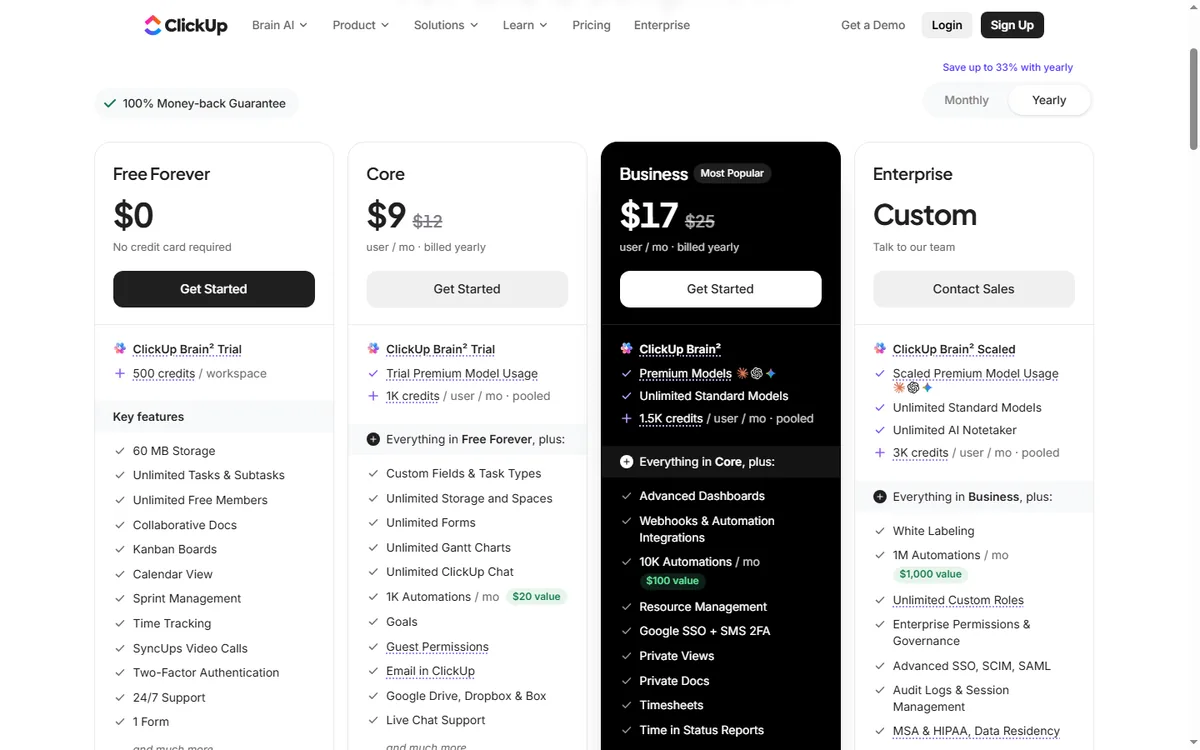
ClickUp prices per user, so the bill grows with headcount. A 10-person team on Business costs about $170 per month. GoHighLevel charges a flat rate with unlimited contacts, seats, and sub-accounts, and automation is included in the core subscription. For an agency running many clients and users, GoHighLevel is often cheaper at scale; for an internal team that wants a productivity hub, ClickUp’s per-user pricing with a free tier is attractive.
CRM and Sales Workflow
ClickUp is not a sales-first CRM, but it can be configured for CRM-like workflows: custom statuses, tasks per deal, pipelines, and views. It works well for lightweight deal tracking and project delivery. For serious sales operations, you would often pair ClickUp with a dedicated CRM or build a ClickUp CRM template.
GoHighLevel is CRM-first, with pipelines, custom fields, opportunities, tasks, and per-contact activity history across email, SMS, calls, forms, and payments. It adds marketing and fulfillment layers that ClickUp does not have: funnels, websites, email campaigns, surveys, and reputation management. If your business runs on pipeline management plus client marketing and delivery, GoHighLevel gives you the whole system.
Build a Lead-to-Booking Flow in GoHighLevel
This is the automation an agency owner builds when a prospect submits a project inquiry form. It runs inside one workflow and touches the CRM, SMS, email, and the calendar.
- Trigger: Form Submitted on the form named ‘Project Inquiry’. The workflow starts the moment the prospect clicks submit.
- Action: Send SMS to the contact with the message ‘Hi {{contact.first_name}}, this is Dana at Northline Studio. I got your inquiry about the website rebuild. Which afternoon suits you for a quick 15-minute call?’
- Wait: 30 minutes, fixed delay, to give the prospect time to reply before the next touch.
- If/Else: check whether the contact replied. If yes, go to the booking branch. If no, continue to the email step.
- Action: Send Email with the subject ‘Your project inquiry’ and the body ‘Hi {{contact.first_name}}, I wanted to follow up on your inquiry. Here is my calendar link for a 15-minute call: {{custom_values.booking_link}}. If you would rather reply here, that works too.’
- Wait: 1 day, fixed delay.
- If/Else: check whether the contact booked an appointment. If yes, add the tag ‘booked’ and create an opportunity in the Pipeline Stage ‘Discovery Call’. If no, add the tag ‘cold-lead’ and assign the contact to the owner.
- Action: Send SMS with the message ‘Hi {{contact.first_name}}, just checking in one more time. If the timing is off, no problem, I will close your file for now.’
- Action: Add Task for the owner titled ‘Call cold lead’ due in 2 days, so a human makes the final attempt.
Measure two numbers: the share of form submissions that book a call within 48 hours, and the share that reply to the first SMS. If the reply rate is low, rewrite the first message. If the booking rate is low, shorten the wait before the email. For more on connecting GoHighLevel to other tools, see our GoHighLevel vs Make comparison.
Two Scenarios That Show the Split
Imagine a two-person web design studio in Austin, Texas, that bills $4,500 per project and closes about four projects a month from referrals. The owner tracks leads in a spreadsheet, sends proposals from Gmail, and loses track of who replied. After moving to GoHighLevel Starter at $97 per month, the studio builds a funnel with a project inquiry form, a pipeline with stages for New Lead, Proposal Sent, and Won, and a workflow that texts the owner when a form lands. If the studio closes one extra project per quarter that it would have lost in the spreadsheet, the $97 pays for itself many times over. This is an illustrative scenario, not a report of real outcomes.
Imagine a nine-person software consultancy in Denver, Colorado, that runs three client sprints at once and pays $153 per month for ClickUp Business at $17 per user. The team needs Gantt views, docs linked to tasks, and goal tracking, and it already pays for a separate email tool and a separate CRM. Adding GoHighLevel would not replace ClickUp for sprint planning, but it would replace the email tool and the CRM for about $97 per month, which is less than the two separate subscriptions. The consultancy keeps ClickUp for delivery and adds GoHighLevel for client communication. This is also an illustrative scenario. For a different angle on automation tools, read our GoHighLevel vs Zapier guide.
Project Management and Docs
ClickUp is a leader in project management. Tasks, subtasks, dependencies, multiple views (list, board, Gantt, calendar, whiteboard), docs, goals, and dashboards make it a strong work hub. It is designed for teams that manage many projects and need flexible workflows.
GoHighLevel is not a general-purpose project management tool. It focuses on client operations: sub-accounts per client, pipelines, funnels, email, and automation. You can track onboarding tasks inside sub-accounts, but if your primary need is deep project management and documentation for an internal team, ClickUp is the better fit.

Automation Capabilities
ClickUp automation focuses on work and project triggers: when a task status changes, when a form is submitted, when a deadline approaches, and so on. Free plans get 100 automations per month, Core 1K, Business 10K, Enterprise 1M. ClickUp Brain adds AI credits for AI-assisted work.
GoHighLevel workflows are contact-centric and multi-channel. They trigger on contact behavior across email, SMS, calls, forms, page visits, and payments, then run email, SMS, internal actions, and even AI voice. One workflow can send an email, log a call, and update a pipeline at the same time. For agencies and SMBs, GoHighLevel automation is more aligned with the client lifecycle, because it is native to the CRM and messaging stack.
Integration Ecosystem
ClickUp has a large integration ecosystem: Slack, Google Workspace, Figma, GitHub, Zoom, Zapier, Make, and 1,000+ apps through its API. It connects well with development, design, and productivity tools.
GoHighLevel has a native marketplace, API, webhooks, and works with Zapier and Make itself when you need external connections. Its native integrations cover what agencies and SMBs typically need, and you can still connect it to the wider ecosystem. If you need a very long tail of niche integrations, ClickUp’s directory is broad and mature.
Funnels, Email, and SMS
ClickUp is not a landing page, email marketing, or SMS platform. It does not build funnels or send campaigns. You would connect a separate funnel builder, email service, and SMS tool through integrations.
GoHighLevel bundles funnels, websites, email marketing, SMS, surveys, and reputation management into the core subscription. You can launch a landing page, send an email sequence, and track the lead in the pipeline without leaving the platform. For SMBs and agencies, GoHighLevel’s built-in marketing stack removes a lot of ClickUp-style stitching.
Agency and Multi-Client Use
GoHighLevel is built for agencies. Sub-accounts give each client an isolated workspace with its own CRM, funnels, sites, and automations. On Agency Pro you get SaaS mode and white-label capabilities to resell the platform. Managing dozens of client accounts inside one system is the core design.
ClickUp is popular with agencies as an internal delivery and project management tool. You can create workspaces and folders per client, track tasks, and share docs. However, there is no white-label reseller model in the same sense, and it is not a client-facing marketing platform.
Onboarding Time for a Solo Operator vs a Team
ClickUp is flexible, and that flexibility means a learning curve. Most teams pick up tasks quickly, but advanced views, automations, and AI require onboarding. The free plan is generous, which helps teams learn without cost.
GoHighLevel has more modules, so the initial learning curve is steeper. You learn the CRM, funnels, websites, and workflows alongside each other. However, HighLevel provides free training, an academy, and a large agency community, and most operators find the platform clickable within a few days.
Match the Platform to Who Owns the Work
- Pick GoHighLevel when your agency, SMB, or service business wants a single flat-rate system covering client relationships, landing pages, messaging, and workflow automation.
- Pick ClickUp when your priority is organizing work rather than running client operations, since it shines at tasks, documents, targets, and a free tier that goes a long way.
- Choose by team: ClickUp prices per user and grows with headcount; GoHighLevel is a flat rate with unlimited seats.
- Choose by stack: if you want one operating platform, GoHighLevel consolidates; if your team mainly manages internal projects, ClickUp is the leader.
A practical way to decide: map your operation. If your team runs projects and documentation internally and already has marketing tools, ClickUp is a fast, affordable answer. If you want CRM, funnels, email, and SMS in one place with automation around your clients, GoHighLevel gives you more for the money.
Where GoHighLevel Pulls Ahead
- GoHighLevel bundles client management, landing pages, messaging, and workflow automation under one subscription.
- GoHighLevel: flat pricing with unlimited contacts and seats.
- GoHighLevel: agency sub-accounts, white label, and SaaS mode.
- GoHighLevel: multi-channel automation around the client lifecycle.
- ClickUp: flexible project management, docs, goals, and whiteboards.
- ClickUp: generous free plan and per-user pricing with powerful automations.
Where ClickUp Falls Short for Client Work
- GoHighLevel: broader platform means a steeper initial learning curve.
- GoHighLevel: not a general-purpose project management hub.
- ClickUp: per-user pricing grows with headcount and gets expensive.
- ClickUp: not a native CRM, marketing automation, or funnel platform.
- ClickUp: flexibility can mean a learning curve for advanced workflows.
FAQ
Is GoHighLevel better than ClickUp? For teams that would rather consolidate their marketing and CRM tools than juggle separate platforms, the all-in-one approach is the main draw. For teams that need powerful project management, docs, and productivity, ClickUp is the stronger, more flexible tool.
Can GoHighLevel replace ClickUp? For many common use cases, yes. GoHighLevel has pipelines, tasks, and automation plus marketing tools you would not get from ClickUp. If your team strongly depends on ClickUp’s project views and docs, you may keep both and sync data.
Which is cheaper, GoHighLevel or ClickUp? GoHighLevel starts at $97/month flat with unlimited contacts, seats, and sub-accounts. ClickUp has a Free Forever plan, Core at $9 per user per month, and Business at $17 per user per month, so cost depends on your team size and feature needs.
Does GoHighLevel integrate with ClickUp? You can connect GoHighLevel and ClickUp through APIs and integration tools like Zapier or Make, so you can keep both in sync if you use them together.
Which is better for an agency? GoHighLevel, because of sub-accounts, white label, SaaS mode, and the unified CRM. ClickUp is excellent as an internal delivery and project management tool for agencies.
Can I use GoHighLevel and ClickUp together? Yes, they complement each other: GoHighLevel runs your marketing and client operations, and ClickUp serves as your team’s project management and documentation hub.
The Platform That Fits Your Client Load
Day 1: list every tool you pay for that touches a lead, from form to invoice. Day 3: build one GoHighLevel workflow for your busiest inquiry form and watch it run for 48 hours. Day 7: compare the flat GoHighLevel bill against your per-user ClickUp bill plus the separate email and SMS tools, then decide which platform owns client communication and which owns internal delivery. If you want the full stack, start a 14-day trial and map your own pipeline before you commit.
Disclaimer: We are an independent review site. Some links in this article are affiliate links, and we may earn a commission at no extra cost to you if you purchase through them. We only recommend tools we test in real client operations.
About the Author

Antonio Vance is B2B SaaS Operations Director & Lead Reviewer (SaaSFlowLab Editorial Team). He has spent 8+ years deploying and auditing enterprise CRM, marketing automation, and email deliverability infrastructures for digital agencies. At SaaSFlowLab, he builds each review from the vendors’ published pricing pages, help-center documentation and changelogs, cross-checks them against verified user reviews, and re-checks prices and plan limits every month.