
Executive Summary
You are staring at two browser tabs: one shows a Mailchimp invoice that climbed again as your list grew past 5,000 contacts, the other shows a GoHighLevel sub-account where a form submission can fire an email, a text, and a pipeline move in the same breath. The GoHighLevel vs Mailchimp decision rarely comes down to which email builder looks nicer. It comes down to whether email is the whole job or one channel inside a business engine that also needs a CRM, funnels, SMS, and client workspaces.
- Best For: agencies and growing businesses that want email, SMS, CRM, funnels, and client delivery in one managed platform (GoHighLevel); marketers and ecommerce teams that want a polished email and SMS marketing tool with strong templates and audience insights (Mailchimp).
- Pricing: GoHighLevel $97/$297/$497 per month with unlimited contacts; Mailchimp starts free and scales by contact count (Standard from $20/month at 0-500 contacts).
- Strength (GHL): email and SMS live inside a full CRM with funnels, pipelines, phone, and white-label sub-accounts.
- Strength (Mailchimp): deep email marketing features, segmentation, and a mature free plan for smaller lists.
Below we compare both platforms across pricing, email features, automation, CRM, SMS, ecommerce, agency use cases, and learning curve, then give a clear verdict for different buyer profiles.
Table of Contents
- Agencies vs Email-First Marketers: Who Wins
- Two Buyer Philosophies: Email Craft vs Client Operations
- Email Specialist vs Agency Operating System
- Pricing Compared
- GoHighLevel vs Mailchimp: Email Marketing Compared
- Automation and Journeys
- Build a Multi-Channel Welcome Flow in GoHighLevel
- Two Scenarios: A 12,000-Contact List and a 9-Client Agency
- CRM and Contact Management
- SMS and Multi-Channel
- Ecommerce and Audience Insights
- Agency and Multi-Client Use
- Setup Time: Campaigns vs Full Stack
- Match the Platform to Your Contact Count
- Where GoHighLevel and Mailchimp Each Shine
- FAQ
- The Contact-Count and Channel Test
Agencies vs Email-First Marketers: Who Wins
Agencies and growing businesses that have outgrown email alone get more from GoHighLevel, since paid plans include unlimited contacts and connect every message to the pipelines, funnels, calling and automation that turn a reply into a booked call, a signed deal or a renewal. If you are a smaller marketer who sends campaigns and wants a polished, mature email tool with a real free tier, Mailchimp is easier to start with and remains excellent at email. In 2026, the deciding factor is operational scope: GoHighLevel wins when email is one channel inside a business engine; Mailchimp wins when email marketing is the entire job.

Two Buyer Philosophies: Email Craft vs Client Operations
A buyer picks Mailchimp when email is the craft. The team is small, the list is the product, and the weekly rhythm is campaigns, segments, and A/B tests. They want a polished builder, a template library, and audience insights without learning a CRM. Budget logic follows contact count: free at 1,000 contacts, then a line item that grows with the list. The tool is owned by a marketer, not an operations lead.
A buyer picks GoHighLevel when email is one move inside a larger game. The agency runs many client accounts, each needing its own CRM, funnels, and automations. The owner cares less about template depth and more about whether a lead who fills a form gets a text, a call task, and a pipeline card without three integrations. Flat pricing with unlimited contacts changes the math at scale.
Each philosophy breaks down at its edge. Mailchimp’s per-contact pricing turns painful for a 10,000+ list, and its lack of a native pipeline means a sales team still needs another system. GoHighLevel’s breadth means a solo email marketer pays for modules they never open, and its reporting is less granular than a dedicated email tool.
If you already run a separate CRM and only need campaigns, the Keap comparison shows how another CRM-first tool handles that split. The honest question is not which platform has more features, but which philosophy matches who owns the tool and what the list is for.
Email Specialist vs Agency Operating System
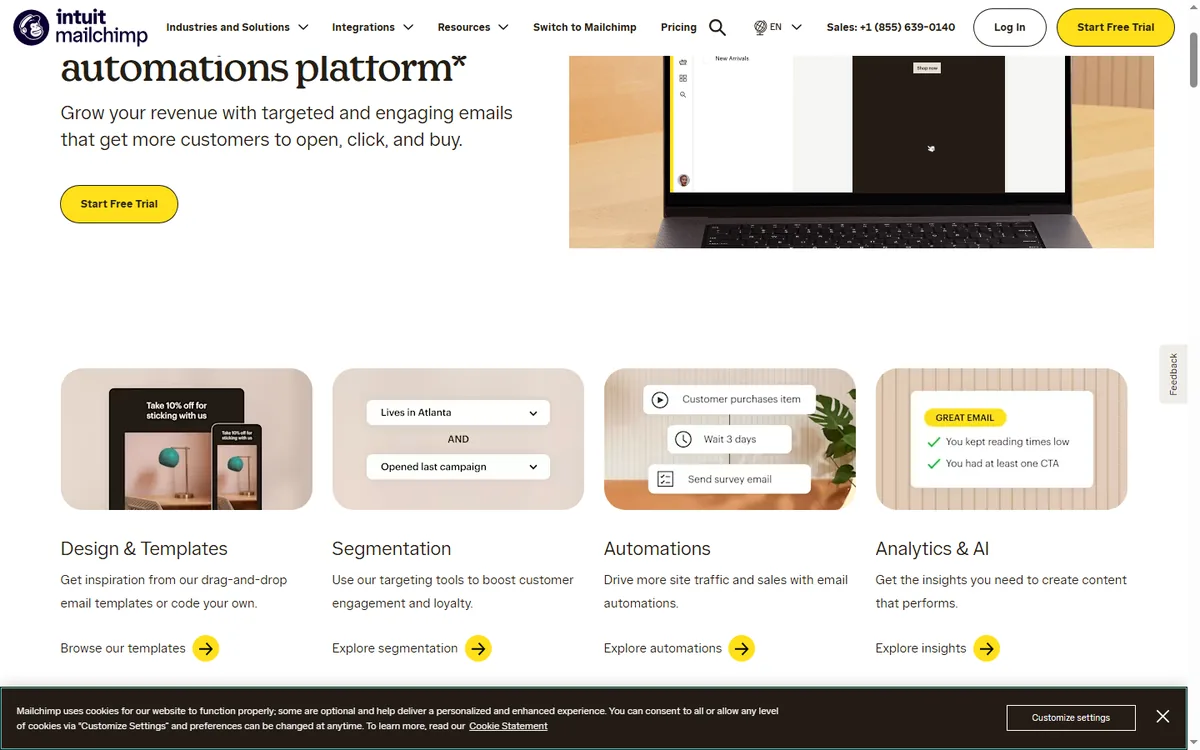
Mailchimp started as an email newsletter tool and evolved into a full marketing platform: email campaigns, SMS, landing pages, forms, journeys, reports, and audience insights. It integrates with ecommerce platforms like Shopify and WooCommerce, and it is known for ease of use, strong templates, and a generous free plan for small lists.
GoHighLevel is an all-in-one business operating system. It includes email campaigns, sequences, broadcasts, and automation tied to contacts, plus a full CRM with pipelines, funnels and websites, SMS, call tracking, phone, voice AI, surveys, reputation management, and agency sub-accounts. Email is a powerful module, but it lives inside a larger engine designed to run client operations.
Pricing Compared
| Plan | Monthly Price | Key Limits | Best For |
|---|---|---|---|
| GoHighLevel Starter | $97/month | 3 sub-accounts, core CRM, funnels, email, SMS, unlimited contacts | SMBs |
| GoHighLevel Unlimited | $297/month | Unlimited sub-accounts, full funnels + websites + phone | Agencies |
| GoHighLevel Agency Pro | $497/month | SaaS mode, whitelabel, advanced features | Reselling agencies |
| Mailchimp Free | $0/month | 1,000 contacts, 10,000 emails/month, basic templates | Hobby / new lists |
| Mailchimp Essentials | From $13/month | 0-500 contacts, 5,000 emails, A/B testing, 3 audiences | Starting businesses |
| Mailchimp Standard | From $20/month | 0-500 contacts, 6,000 emails, journeys, automation, 5 audiences | Growing businesses |
| Mailchimp Premium | From $350/month | Advanced segmentation, unlimited seats, phone support | High-volume senders |
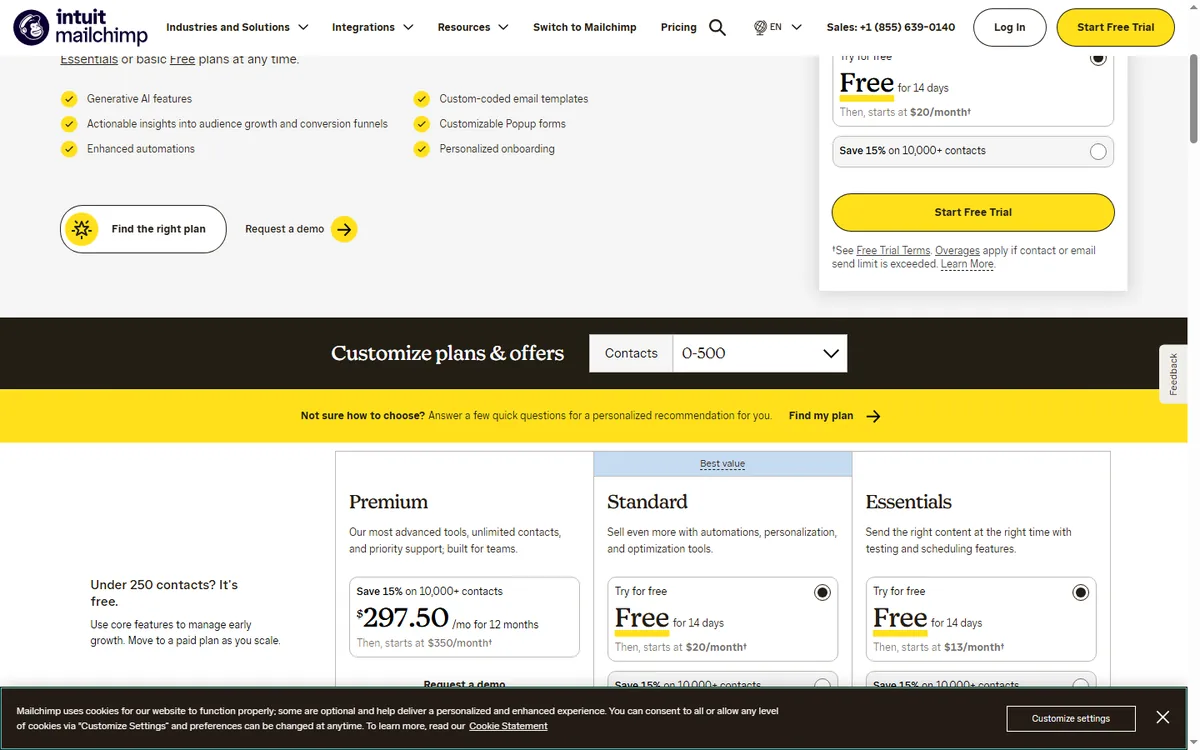
Mailchimp prices by contact count, so the same plan costs more as your list grows. At 2,500-5,000 contacts, Standard jumps well above the entry price; at 10,000+ contacts it becomes a serious line item. GoHighLevel charges a flat rate with unlimited contacts, which makes it substantially cheaper at scale. For a solo marketer with a small list, Mailchimp’s free tier is unbeatable. For an operator who manages many contacts and multiple clients, GoHighLevel’s flat pricing wins on total cost.
GoHighLevel vs Mailchimp: Email Marketing Compared
Mailchimp is a specialist. Its email builder, template library, segmentation, and reporting are mature and polished. You can build a beautiful campaign quickly, A/B test subject lines, and get detailed deliverability and engagement insights. For a marketer whose core craft is email, Mailchimp remains one of the best tools available.
GoHighLevel includes email campaigns, sequences, and broadcasts natively. The builder is solid for marketing emails, and deliverability is managed inside the same platform as the CRM and funnels. It may not have Mailchimp’s depth of template design or granular reporting, but it covers the full journey: a lead enters through a funnel, receives an email, gets a text, and is tracked in the pipeline. For operations that need email connected to everything else, GoHighLevel removes the glue work.
If email deliverability at enterprise scale is your main concern, Mailchimp’s dedicated infrastructure has an edge. If you want email as one step in a multi-channel client journey, GoHighLevel is more practical.
Automation and Journeys
Mailchimp visual journeys let you automate email and SMS based on contact behavior, tags, and ecommerce activity. They are easy to build and reliable for classic lifecycle flows: welcome, abandoned cart, win-back, and re-engagement. Mailchimp offers prebuilt journey templates that get you live quickly.
GoHighLevel workflows trigger on contact behavior across email, SMS, calls, forms, page visits, and payments, then run email, SMS, internal actions, and even AI voice. One workflow can send an email, log a call, and update a pipeline at the same time. You can also create trigger links and custom webhooks. For operators who need multi-channel automation, GoHighLevel is more powerful and flexible than a pure email journey tool.

Build a Multi-Channel Welcome Flow in GoHighLevel
This is the automation an agency would build for a client whose email list feeds a service business. It turns one form submission into a tagged contact, a welcome email, a text, and a pipeline opportunity.
- Trigger: Form Submitted on the client’s ‘Free Consultation’ form. Action: Add Contact Tag ‘consult-lead’. Action: Create/Update Opportunity in the ‘New Leads’ pipeline stage.
- Action: Send Email with subject ‘Your consultation request landed’ and body ‘Hi {{contact.first_name}}, we have your request and will confirm a time today. Reply here if your schedule changed.’
- Wait: 10 minutes. If/Else: check whether the contact has replied. If yes, Action: Internal Notification to the assigned user and Go To the booking step. If no, continue.
- Action: Send SMS ‘{{contact.first_name}}, this is the team at {{location.name}}. Want to grab a 15-minute slot this week? Reply YES and we will send times.’
- Wait: until the contact replies or 1 day passes. If/Else: if the reply contains ‘YES’, Action: Send SMS with two time options and Assign to User. If no reply, Action: Add Task for a manual call.
- Trigger: Customer Booked Appointment on the ‘Consultation’ calendar. Action: Send SMS ‘You are booked for {{appointment.start_time}}. Reply R to reschedule.’ Action: Update Contact Field ‘status’ to ‘booked’.
- Wait: until 24 hours before the appointment. Action: Send SMS ‘Quick reminder: {{appointment.start_time}} tomorrow. See you then.’
- Trigger: Appointment Status changes to ‘showed’. Action: Send Review Request after a 2-hour wait. If status is ‘no-show’, Action: Send SMS ‘Missed you today, {{contact.first_name}}. Want to pick a new time?’ and Add to Workflow for rebooking.
Measure reply rate on the first SMS, booking rate from form to calendar, show rate on the consultation calendar, and the share of missed appointments that rebook after the follow-up text. Tag every branch so the client can see which message moved the contact.
Running the same flow in Mailchimp means journeys for the email steps, separate SMS handling on paid plans, and no native pipeline or task assignment, so the CRM actions would need another system. For a deeper look at CRM-first alternatives, the Pipedrive comparison covers that trade-off.
Two Scenarios: A 12,000-Contact List and a 9-Client Agency
Imagine a Portland, Oregon outdoor-gear retailer with 12,000 email contacts, three staff, and a Shopify store. Mailchimp Standard at that list size is a serious monthly line item, and abandoned-cart flows live in one tool while customer follow-up lives in a spreadsheet. Moving campaigns into GoHighLevel puts the same contacts under a flat $97 plan, ties purchase data to a pipeline, and lets a form submission trigger an SMS pickup reminder. If 2% of 12,000 contacts book a fitting appointment through the new flow, that is 240 extra store visits a year. This is an illustrative scenario, not a reported result.
Imagine a Tampa, Florida marketing agency with nine retainer clients and a four-person team. Each client currently has a separate Mailchimp account, so the agency juggles nine logins and nine bills. On GoHighLevel Unlimited at $297, each client workspace runs on its own CRM, funnels, and email, and the agency manages all nine from one dashboard. If each client previously paid $60 to $150 monthly for email alone, consolidating removes nine separate subscriptions and the glue work between them. The arithmetic is simple; the operational relief is the real prize.
CRM and Contact Management
Mailchimp calls its database an audience. You manage contacts, tags, segments, and preferences, and you sync with ecommerce or a connected CRM. It is excellent for list health and segmentation, but it is not a pipeline CRM. There is no sales pipeline, opportunities, tasks, or deal stages.
GoHighLevel is CRM-first. Pipelines, custom fields, opportunities, tasks, and per-contact activity history across email, SMS, calls, forms, and payments are native. For agency client work, each client gets its own sub-account with an isolated CRM workspace. If your business runs on pipeline management, GoHighLevel’s native CRM is a decisive advantage over Mailchimp.
SMS and Multi-Channel
Mailchimp includes SMS on paid plans (Essentials and above) with two-way messaging by phone number. It is functional but carries per-message costs and is managed separately from email journeys in some flows.
GoHighLevel treats SMS as a first-class channel alongside email. You can send individual texts, SMS broadcasts, and automated SMS in workflows, and every message is logged to the contact timeline. Combined with call tracking and phone numbers, GoHighLevel gives you true multi-channel follow-up that Mailchimp cannot match natively.
Ecommerce and Audience Insights
Mailchimp is a leader for ecommerce email: abandoned cart, product recommendations, purchase behavior segments, and predictive analytics on higher tiers. If you run a Shopify or WooCommerce store, Mailchimp’s integrations are deep and battle-tested.
GoHighLevel can capture purchases through its funnel and membership tools, and it stores order data in the CRM, but it is not built as a dedicated ecommerce marketing engine. For pure online stores, Mailchimp’s ecommerce features are stronger. For agencies and service businesses that happen to sell products, GoHighLevel covers checkout, membership, and follow-up well enough.
Agency and Multi-Client Use
GoHighLevel is built for agencies. Sub-accounts give each client an isolated workspace with its own CRM, funnels, sites, email, and automations. On Agency Pro you get SaaS mode and white-label capabilities to resell the platform. Managing dozens of client accounts inside one system is the core design.
Mailchimp has a partner program and lets you manage multiple accounts through a partner dashboard on higher tiers, but it is not a multi-tenant agency platform with per-client isolation and white-label delivery. For an agency running client marketing, GoHighLevel is the cleaner fit.
Setup Time: Campaigns vs Full Stack
Mailchimp is approachable. The interface centers on campaigns, journeys, and audiences, and you can send your first campaign quickly. Support is included on paid plans, with faster support on higher tiers, plus a large knowledge base and community.
GoHighLevel has more modules, so the initial learning curve is steeper. You learn the CRM, funnels, websites, and workflows alongside email. However, HighLevel provides free training, an academy, and a large agency community, and most operators find the platform clickable within a few days. The practical difference is scope: Mailchimp is easier for email-only; GoHighLevel takes more setup but runs a complete operation.
Match the Platform to Your Contact Count
- Choose GoHighLevel if you need email and SMS inside a CRM with funnels, pipelines, and client delivery, or you run an agency with multiple client accounts.
- Choose Mailchimp if your core job is email marketing, you run an ecommerce store, or you want a generous free tier for a small list.
- Choose by scale: Mailchimp prices per contact and gets expensive as your list grows; GoHighLevel charges a flat rate with unlimited contacts.
- Choose by stack: if you already use a separate CRM and just want email, Mailchimp fits; if you want one system for everything, GoHighLevel consolidates.
A practical way to decide: count your contacts and map your channels. If you have a small list and email is your only channel, start free with Mailchimp. If you manage thousands of contacts across email, SMS, calls, and pipelines for multiple clients, GoHighLevel gives you more for the money.
Where GoHighLevel and Mailchimp Each Shine
- GoHighLevel: email, SMS, phone, CRM, funnels, and automation in one platform.
- GoHighLevel: unlimited contacts on paid plans.
- GoHighLevel: agency sub-accounts, white label, and SaaS mode.
- GoHighLevel: multi-channel automation across email, SMS, calls, and pages.
- Mailchimp: mature, polished email builder and template library.
- Mailchimp: generous free tier for small lists.
- Mailchimp: deep ecommerce and audience insights.
Where Each Platform Falls Short
- GoHighLevel: email builder and reporting are less granular than Mailchimp.
- GoHighLevel: steeper learning curve due to platform breadth.
- Mailchimp: pricing scales with contacts and gets expensive at volume.
- Mailchimp: no native pipeline CRM or multi-channel phone/SMS depth.
- Mailchimp: not built as a multi-client agency platform.
FAQ
Is GoHighLevel better than Mailchimp? For agencies and businesses that need email, SMS, CRM, funnels, and automation in one system, GoHighLevel is usually better. For marketers whose core job is email marketing or ecommerce, Mailchimp can be the better tool.
Can GoHighLevel replace Mailchimp? Yes, for most marketing use cases. GoHighLevel includes email campaigns, sequences, broadcasts, workflows, and SMS. If you rely on Mailchimp’s deep template design or ecommerce predictive features, you may miss those specifics.
Which is cheaper, GoHighLevel or Mailchimp? GoHighLevel starts at $97/month with unlimited contacts and includes email, SMS, CRM, and funnels. Mailchimp starts free but prices by contact count; Standard is $20/month at 0-500 contacts and scales up sharply as your list grows.
Does GoHighLevel have email automation like Mailchimp journeys? Yes, GoHighLevel workflows automate email, SMS, and internal actions based on contact behavior, page visits, and payments. It is multi-channel, which goes beyond Mailchimp journeys.
Which is better for ecommerce? Mailchimp has deeper ecommerce email features for Shopify and WooCommerce stores. GoHighLevel covers checkout, memberships, and follow-up but is not a dedicated ecommerce marketing engine.
Can I use GoHighLevel and Mailchimp together? Yes, you can send campaigns from Mailchimp and run CRM and funnels in GoHighLevel, but that duplicates cost and data. Most operators pick one core platform.
The Contact-Count and Channel Test
If your list is small, email is the whole job, and a free tier gets you live this week, start with Mailchimp and revisit when contact pricing bites. If you manage thousands of contacts or multiple client accounts and need email, SMS, pipelines, and funnels under one flat bill, build in GoHighLevel. Weigh your contact count and channel mix before you commit; the HubSpot comparison helps if a deeper CRM is also on the table.
Disclaimer: We are an independent review site. Some links in this article are affiliate links, and we may earn a commission at no extra cost to you if you purchase through them. We only recommend tools we test in real client operations.
About the Author

Antonio Vance is B2B SaaS Operations Director & Lead Reviewer (SaaSFlowLab Editorial Team). He has spent 8+ years deploying and auditing enterprise CRM, marketing automation, and email deliverability infrastructures for digital agencies. At SaaSFlowLab, he builds each review from the vendors’ published pricing pages, help-center documentation and changelogs, cross-checks them against verified user reviews, and re-checks prices and plan limits every month.