Executive Summary
The myth: GoHighLevel has a free plan you can run a business on forever. The reality: there is no permanent free tier. What HighLevel calls free is a 14-day trial on any plan, and it unlocks the full Starter, Unlimited, or Agency Pro feature set without payment during the window. That is the whole free story. People searching for a forever-free version sign up, build nothing for a week, and then get surprised when the trial converts to a paid subscription. This guide separates the GoHighLevel 14 day trial vs free question and shows how to use the window well.
- Best For: agencies, consultants, and SMBs that want to evaluate the full platform before committing to a paid plan.
- Pricing: free for 14 days on any plan, then Starter $97, Unlimited $297, or Agency Pro $497 per month.
- Strength: the trial unlocks the complete feature set, including funnels, CRM, email, and automations.
- Drawback: there is no forever-free plan, so you must plan your evaluation before the trial ends.
Below we compare the 14-day trial against what a real free plan would look like, map out the limits, show you how to use the trial strategically, and answer the most common questions about pricing after the trial.
Table of Contents
- No Free Tier: What the 14-Day Window Really Gives You
- What Is Actually Free at GoHighLevel
- How the 14-Day Trial Works
- Trial Limits and Agency Rules
- Which Plan Should You Trial?
- How to Maximize the 14 Days
- GoHighLevel 14 Day Trial vs Free: True Free Plan
- What Happens After the Trial
- What the Full-Access Trial Does Well
- The Trial Sprint Workflow You Build in GoHighLevel
- Two Illustrative Trial Scenarios: A Solo Consultant and a Small Agency
- Where the Trial Setup Works Against You
- FAQ
- Trial or Free Plan: Which Fits Your Budget Logic
No Free Tier: What the 14-Day Window Really Gives You
There is no permanent free plan at GoHighLevel in 2026. The only free option is the 14-day trial available on every paid plan. During those 14 days you can use the full platform, but once the trial ends you either upgrade to a paid plan or your account is closed. If you are looking for a tool to run a real business on a free tier forever, GoHighLevel is not that tool. If you want to stress-test a complete marketing and CRM stack before paying, the trial is one of the most generous in the category because it does not strip features away.
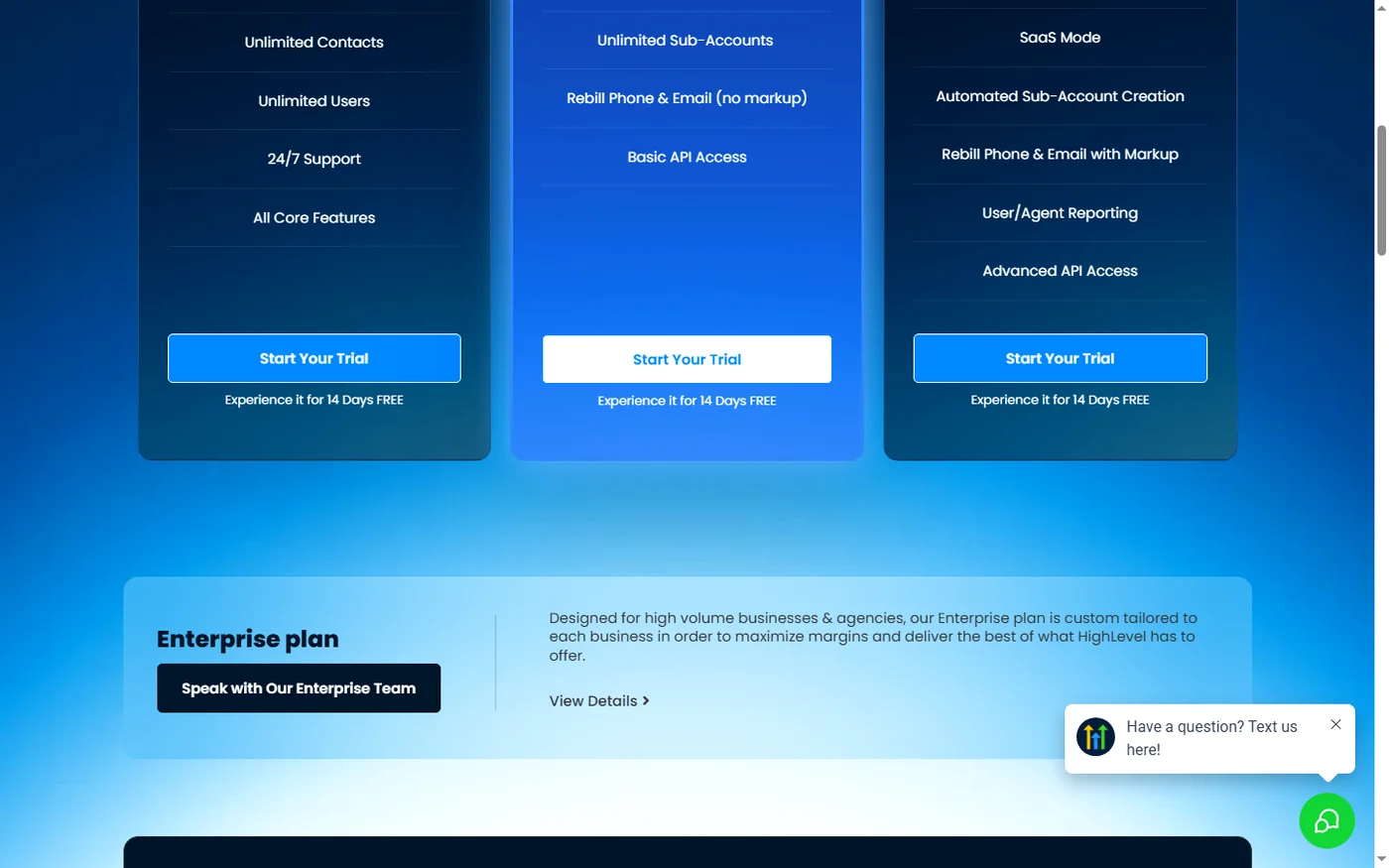
The pricing page states clearly: Start with a FREE 14-day trial on any plan below. That is the whole free story. Everything else is a paid subscription, and the signature line reinforces that the trial is a trial, not a freemium offering.
What Is Actually Free at GoHighLevel
Within the 14-day window, you get access to the complete feature set of the plan you choose. There are no feature gates that unlock only after you pay. That is the key difference between a trial and a freemium plan: freemium tools give you a limited version forever, while a trial gives you the full version for a limited time.
- Full CRM: contacts, pipelines, deals, and tasks.
- Funnels and websites: the same builder used on paid plans.
- Email marketing: campaigns, sequences, and broadcasts.
- Automations: unlimited workflows on the plan you trial.
- Reputation management: review requests and monitoring.
- Call tracking and SMS: included according to your plan limits.
On the home page, HighLevel markets the trial with Start Your 14 Day Free Trial Today, followed by the full list of capabilities: CRM, Voice AI, forms, surveys, quizzes, websites, funnels, landing pages, webinar funnels, chat widget, call tracking, inbound SMS, social planner, and more. In other words, the trial is the whole platform, not a demo.
How the 14-Day Trial Works
- Pick a plan that matches your goals: Starter, Unlimited, or Agency Pro.
- Create your account with your email and details.
- Activate the trial on that plan and start building.
- Use the full feature set for 14 days with no feature gates.
- Decide before day 14: upgrade to keep your account or let it close.
The important operational detail is that the clock starts when you activate. If you sign up but do not build anything for a week, you still lose that week. In our agency practice, we advise clients to book a focused two-week block when they start a trial, so the evaluation actually happens.
Trial Limits and Agency Rules
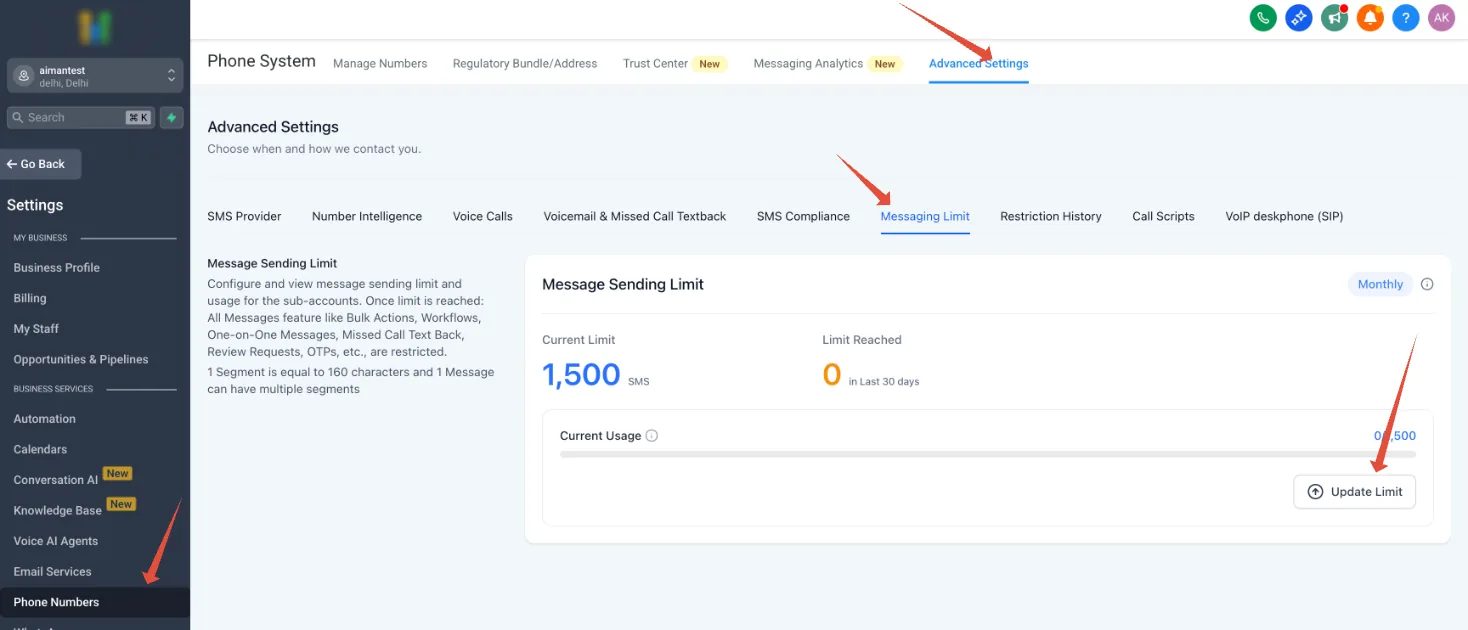
The trial is free, but it is not unlimited in every dimension. HighLevel applies sending and usage rules to trial accounts to protect deliverability, and those rules matter if you plan to run real email campaigns during your evaluation.
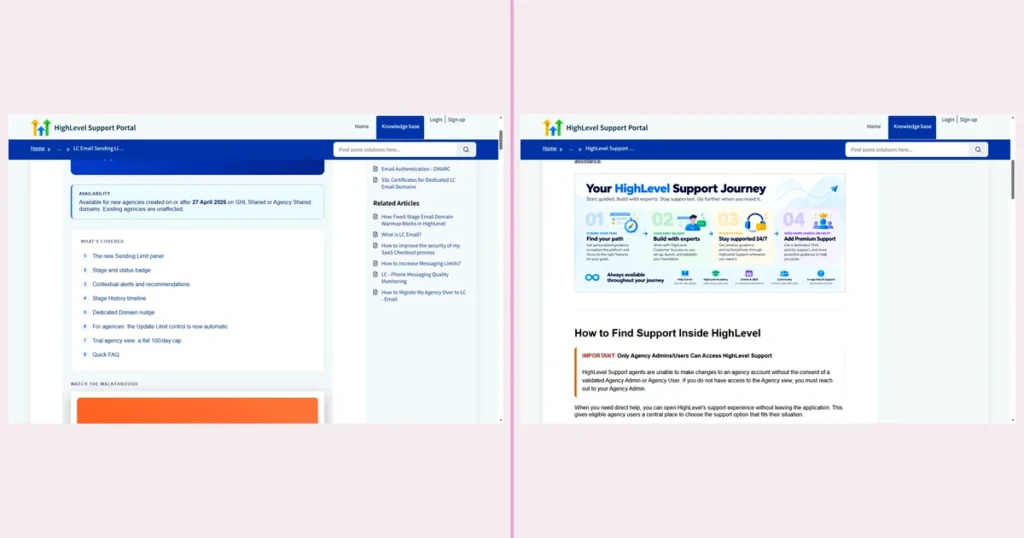
- Trial agency email cap: brand-new trial agencies and sub-accounts operate on a sending limit, with trial agencies capped around 500 emails per day until the account is verified or upgraded.
- Ramp-up stages: sending capacity rolls forward through stages as delivery health stays strong.
- System messages excluded: 1-to-1 emails, payment confirmations, calendar invites, and system notifications do not count against the daily limit.
- Contextual alerts: if delivery rate drops, HighLevel shows recommendations to pause campaigns to unengaged contacts.
Sending Stages and Ramp-Up
HighLevel handles new-account sending through staged limits. A brand-new sub-account starts at Stage 1 with a Warming up status. As sending performance stays healthy, the badge rolls forward through stages and the daily cap increases automatically. If delivery quality drops, the system shows a contextual alert and may pause sending pending review.
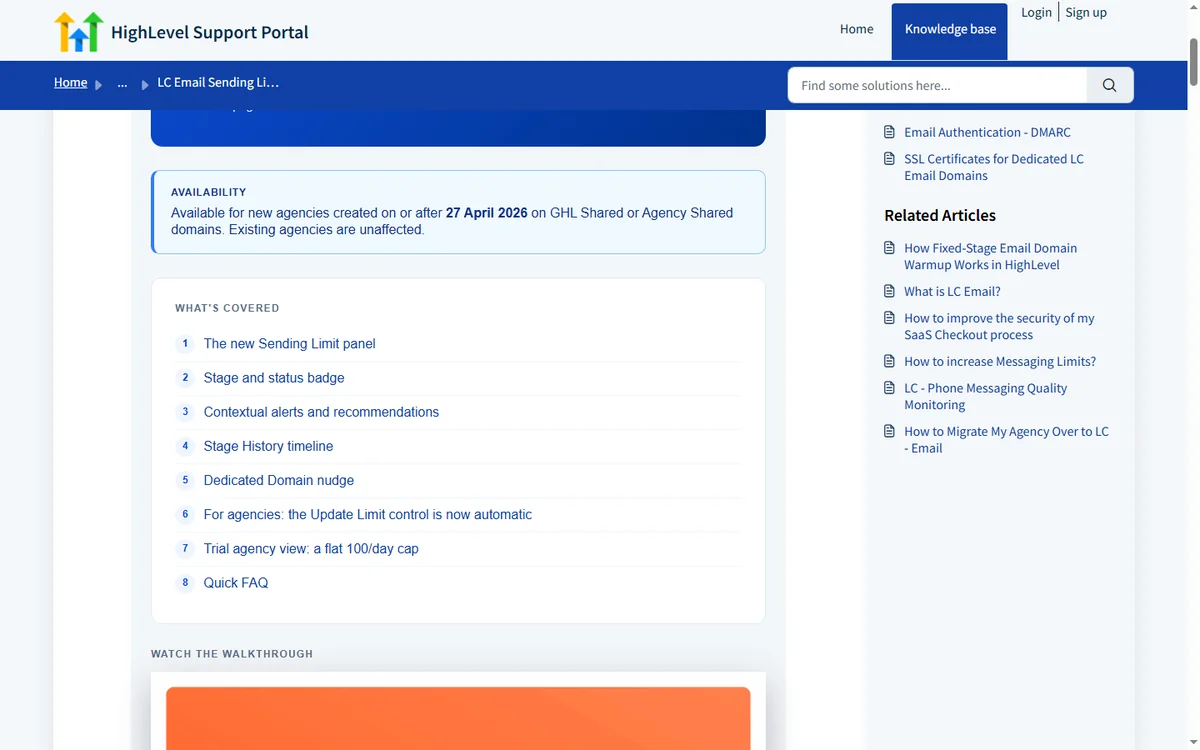
Practical implication: if you want to test cold email volume during the trial, you will hit the cap quickly. Use the trial to test workflows, funnels, and CRM mechanics rather than high-volume sending. Cold outreach testing belongs on a paid plan with a warmed-up domain.
Which Plan Should You Trial?
| Plan | Monthly Price | What You Get | Best For |
|---|---|---|---|
| Starter | $97/month | 3 sub-accounts, core CRM, funnels, email, standard features | Solopreneurs and small teams |
| Unlimited | $297/month | Unlimited sub-accounts, full funnels + websites, automations | Agencies that manage multiple clients |
| Agency Pro | $497/month | SaaS mode, whitelabel, advanced features, priority support | Agencies reselling the platform |
If you are an agency, trial Unlimited or Agency Pro, not Starter. The sub-account structure is the core of how agencies use the platform, and Starter’s three sub-accounts will not show you the real multi-client workflow. If you are a solo business owner, Starter is enough to evaluate the CRM and funnels.
How to Maximize the 14 Days
- Plan a test script before day 1: write down the three workflows you want to automate.
- Build your funnel first: landing page, opt-in form, and thank-you page.
- Set up a real pipeline: create your sales stages and add sample contacts.
- Test automations: trigger a workflow on form submission and trace the contact through.
- Send a small campaign: stay under the trial sending cap and confirm emails arrive.
- Invite your team: add users and test permissions before you pay.
- Document what you build: if you upgrade, you keep everything you created.
A common mistake is treating the trial like a demo and clicking around randomly. The agencies that convert successfully treat day 1 through day 14 as a mini onboarding sprint: they build, test, and measure against their own checklist.
GoHighLevel 14 Day Trial vs Free: True Free Plan
| Dimension | 14-Day Trial | True Free Plan |
|---|---|---|
| Pricing model | 14-day trial (GoHighLevel) | True free plan (freemium) |
| Cost | $0 for 14 days, then monthly fee | $0 forever |
| Features | Full feature set during trial | Usually limited feature set |
| Duration | Fixed 14-day window | Unlimited |
| Upgrade pressure | Automatic subscription after trial | Optional, feature-gated upgrades |
| Best for | Serious evaluation before purchase | Long-term low-budget usage |
For most operators, the 14-day trial is more valuable than a freemium plan because you can validate the exact tool you will pay for. Freemium versions often hide the features that matter, and you end up buying blind. The tradeoff is time pressure: you must be deliberate about testing.
What Happens After the Trial
When the 14-day trial ends, GoHighLevel converts the account to the paid plan you selected. If you do not want to continue, you need to cancel before the trial ends. Data you created during the trial is tied to your account, and if the account closes without a paid subscription, access stops.
From an operations standpoint, build your Exit Plan before day 10: decide your upgrade decision criteria in advance. If the trial workload hits your targets, upgrade. If not, cancel cleanly. Agencies that decide on the fly usually either pay for a tool they never set up, or miss the deadline and lose their account.
What the Full-Access Trial Does Well
- Full features: no freemium gates; you test the real platform.
- Generous length: 14 days is enough to build and test meaningful workflows.
- Any plan: you can trial Starter, Unlimited, or Agency Pro.
- Everything you build persists: work carries over if you upgrade.
- No separate demo environment: you learn the actual interface you will use.
The Trial Sprint Workflow You Build in GoHighLevel
This is the exact automation to build during the trial so you test the platform under real conditions. Build it once, trace it end to end, and you will know whether the tool fits before day fourteen.
- Trigger: Form Submitted (a test opt-in form named ‘Trial Lead Capture’). Action: Add Contact Tag ‘trial-lead’. Action: Send Email with the subject ‘Thanks for reaching out’ and the body ‘Hi {{contact.first_name}}, thanks for your interest. Here is what happens next.’
- Wait: 10 minutes. Action: Send SMS ‘Hi {{contact.first_name}}, this is a quick check-in. Reply YES if you want a call this week.’
- If/Else: contact replied YES. Branch one: Action: Create/Update Opportunity in the pipeline stage ‘Call Booked’. Action: Assign to User (yourself). Action: Internal Notification ‘New trial lead wants a call’. Branch two: Action: Add Task ‘Follow up by phone’ due in 24 hours.
- Wait: until 24 hours before the appointment time. Action: Send SMS ‘Hi {{contact.first_name}}, your call is tomorrow. Reply C to confirm or R to reschedule.’
- If/Else: contact replied C. Action: Add Contact Tag ‘confirmed’. If contact replied R: Action: Send SMS ‘No problem. Pick a new time here: {{calendar_link}}.’
- Trigger: Appointment Status (set to Showed). Action: Send Review Request after a 2-hour wait. Action: Add Contact Tag ‘attended’.
- Trigger: Appointment Status (set to No Show). Wait: 1 hour. Action: Send SMS ‘Sorry we missed you. Want to grab another time? Reply BOOK.’
- Trigger: Payment Received. Action: Send Email with the receipt and the line ‘You are all set. Your onboarding call is on the calendar.’ Action: Remove Contact Tag ‘trial-lead’. Action: Add Contact Tag ‘customer’.
- Trigger: Contact Tag (‘customer’). Action: Add to Workflow (the onboarding sequence). Action: Internal Notification ‘New customer — start onboarding’.
What to measure: how many test contacts moved from form submission to booked call, how many reminders produced a reply, and how long each branch took to fire. Watch the trial sending cap on email so a high-volume test does not stall. If the flow runs clean and the numbers look sane, you have your answer on the platform.
Two Illustrative Trial Scenarios: A Solo Consultant and a Small Agency
These are illustrative scenarios, not accounts of real customers.
Imagine a solo marketing consultant in Austin, Texas, running a one-person shop with a handful of retainer clients. She wants a CRM, a funnel builder, and email in one place, but she has no budget for a stack of subscriptions. She starts the Starter trial on a Monday and blocks two hours a day for the next two weeks. Day one she builds a landing page with an opt-in form and a thank-you page. Day three she creates a pipeline with four stages and adds ten sample contacts.
Day seven she triggers a workflow on form submission and traces one contact through email, tag, and task. By day ten she has a working funnel she could hand to a client. If she upgrades at $97 a month and lands one $500 retainer from that funnel, the plan pays for itself four times over in the first month. If she cannot land that retainer, she cancels before day fourteen and loses nothing but time.
Imagine a five-person agency in Denver, Colorado, managing twelve local service clients. The team currently juggles a separate CRM, a form tool, and an email platform, and handoffs between them eat about six hours a week. They trial Unlimited at $297 a month because Starter’s three sub-accounts cannot model twelve clients. They spend the first week recreating two client funnels and one reminder workflow. In week two they invite all five users and test permissions.
If the consolidated setup saves even four of those six weekly hours, that is roughly sixteen hours a month back to billable work. At a $75 hourly rate, that is $1,200 a month in recovered capacity against a $297 subscription. The math only works if the team actually builds during the trial instead of clicking around.
Where the Trial Setup Works Against You
- No forever-free plan: the trial always converts to a paid subscription.
- Sending cap: trial agencies face tight email limits until verified.
- Time pressure: 14 days passes quickly if you do not plan.
- Account closure: if you do not upgrade or cancel, you lose access.
FAQ
Does GoHighLevel have a free plan? No. GoHighLevel offers a 14-day free trial on any paid plan, but it does not have a permanent free tier. After the trial, you pay for Starter, Unlimited, or Agency Pro.
Is the GoHighLevel 14-day trial really free? Yes, you can use the full platform for 14 days without paying. The account converts to a paid subscription when the trial ends unless you cancel before that.
Do I need a credit card for the trial? HighLevel asks for your details when you start the trial, and billing begins after the 14-day window. Review the checkout flow during signup to confirm the exact card policy at the time you activate.
Can I extend the GoHighLevel trial? In some cases HighLevel offers extended trials, for example through the HighLevel Bootcamp or special promotions. Check your account dashboard and official promotions for current extension options.
What happens to my data if I cancel after the trial? Access stops when the account closes without a paid plan. Export any contacts, funnels, or content you created before canceling.
Which plan should I trial as an agency? Trial Unlimited ($297) or Agency Pro ($497) because the sub-account model is how agencies operate. Starter’s three sub-accounts limit a realistic multi-client test.
Trial or Free Plan: Which Fits Your Budget Logic
Day 1: pick your plan, build one funnel and one pipeline, and list the three workflows you want to test. Day 3: trigger the form-to-SMS flow above and trace a contact through every branch. Day 7: invite your team, test permissions, and check the sending cap. By day 10, decide against your own criteria. If the workflow runs clean and the math works, upgrade. If not, cancel before the window closes. For a deeper look at plan costs, see our GoHighLevel pricing guide, and if you are weighing other tools, read our GoHighLevel alternatives comparison and our reasons people quit GoHighLevel.
Disclaimer: We are an independent review site. Some links in this article are affiliate links, and we may earn a commission at no extra cost to you if you purchase through them. We only recommend tools we test in real client operations.
About the Author

Antonio Vance is B2B SaaS Operations Director & Lead Reviewer (SaaSFlowLab Editorial Team). He has spent 8+ years deploying and auditing enterprise CRM, marketing automation, and email deliverability infrastructures for digital agencies. At SaaSFlowLab, he builds each review from the vendors’ published pricing pages, help-center documentation and changelogs, cross-checks them against verified user reviews, and re-checks prices and plan limits every month.